EmDash 1.5: edit together in real time
Turn on collaborative editing, keep a new site out of search engines until launch, send email through your own SMTP server, arrange your own admin sidebars, and edit blocks fields that you can scan at a glance.

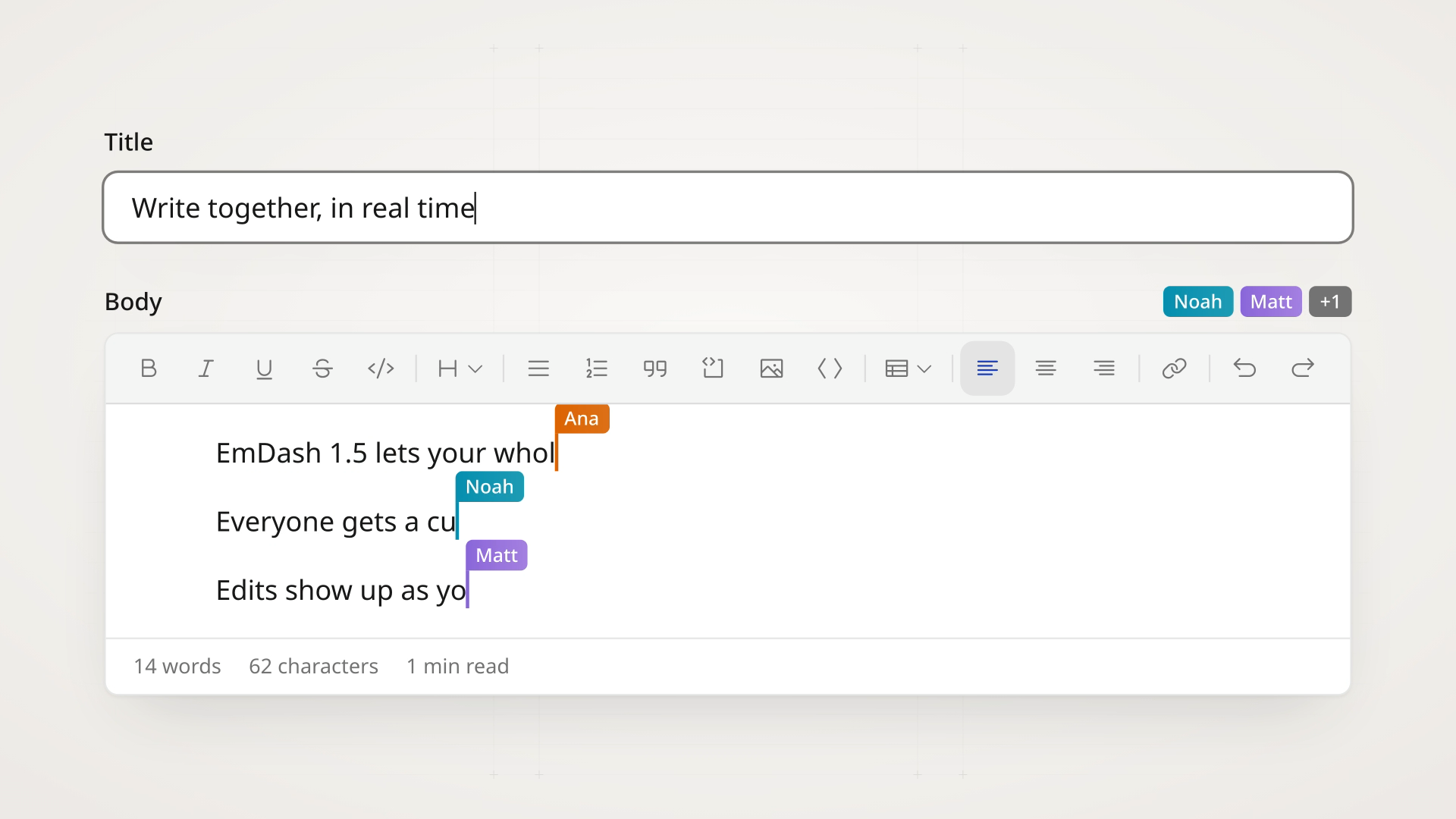
EmDash 1.5 lets several people edit the same entry at once.
Until now, opening an entry locked it: anyone else could only read it or take it over. With collaborative editing on, everyone works in the entry together, sees where the others are, and has their rich text edits merged as they type. It's off by default in this release. Revision history now keeps every version you save, and names everyone who edited each one.
New sites stay out of search engines until you choose to go live, email can go through any SMTP server, and each user can arrange their own admin sidebars. Blocks fields, dialogs and most admin tables have been redesigned, and they all fit on a phone. All of this on top of the usual reliability and bug fixes.
Highlights include:
- Edit together in real time
- Revisions keep every save and name every editor
- Keep a new site out of search engines until launch
- Send email through any SMTP server
- Arrange your own sidebars
- A blocks editor you can scan
- The admin on phones
- Modern image formats
- More options for content types and seeds
- More complete WordPress imports
- The admin in more languages
- Upgrade notes
To update, run this from the project directory:
npx upgrade-emdash@latestOr update by hand:
pnpm up --latest emdash
# or if you are using Cloudflare
pnpm up --latest emdash @emdash-cms/cloudflare
@emdash-cms/cloudflare now requires the exact matching emdash version, so update the two together. With mismatched versions, npm stops the install with an ERESOLVE error (#4582, thanks @swissky).
Database migrations: this release adds six (092 to 097). Most sites can let them run as usual. Two need a planned upgrade on some sites: sites with sandboxed plugins that store KV values, and sites whose plugins declare storage uniqueIndexes. Read the upgrade notes before deploying.
Edit together in real time
With collaborative editing on, several people can edit an entry at the same time (#4695). Each person sees the others' avatars in the editor bar and which field each one is in, along with their cursors in rich text. Rich text edits made at the same time merge, and undo reverts only your own edits.
Each entry has a room that saves everyone's edits together, with the same permissions, validation, hooks and revisions as other saves. Changes from the REST API, MCP, the CLI, the visual editor and plugins appear in open editors. If your connection drops, the Save button shows Offline after 5 seconds. You can keep typing, and your edits merge when you reconnect. Publishing, preview and the other actions wait until then. Publishing, scheduling and restoring a version save everyone's edits first.
Edits in other fields don't merge in the same way. When two people change a plain field at the same moment, one change wins. Bylines, references and taxonomy terms keep what each person adds and removes. If someone turns a block into another type, moves it or deletes it while someone else is typing in it, that typing is lost. Edits that can't merge are saved as a recovery revision, so they stay in the entry's history (#4668).
Collaborative editing works in collections with revisions. Elsewhere, the editor keeps the edit lock, and so do browsers that can't open a WebSocket connection. It adds no queries to public pages.
To turn it on, set the option, then rebuild and deploy:
emdash({
	coEditing: true,
});- Node.js with
@astrojs/noderuns collaborative editing in the site's own process. A reverse proxy must forward WebSocket upgrades on/_emdash/api/content/{collection}/{id}/room. If several processes share one database, send each room path to the same process. Sites usingnode:clusteror PM2 cluster mode keep the edit lock. See Collaborative editing on Node.js for proxies, other WebSocket handlers and shutdown timeouts. - Cloudflare sites created from the 1.5 templates are already set up. For an existing site, add the
EMDASH_ROOMSDurable Object binding and export the room classes from the Worker entry, as Collaborative editing on Cloudflare shows.
Edit with other people describes what editors see. API clients and plugins should read the changes for API clients and plugins in the release notes. Two of them apply whether or not collaborative editing is on. Content and term updates accept an optional expected list and return 409 LIST_CONFLICT when it is stale. Hooks receive editedBy, and a hook that checks the actor's role should check everyone in it.
Collaborative editing is the work of @khoinguyenpham04, who wrote 24 of this release's changes.
Revisions keep every save and name every editor
Autosave used to replace the previous version even when you had saved it with Save. Now autosave only replaces earlier autosaves, so versions you save yourself stay in Revisions (#4637).
Each version names everyone who edited it since the version before, such as "Ana, Ben, and 1 other person". The publish confirmation names everyone who edited the entry since it was last published. The revisions API and the MCP revision_list tool return editedBy on each version. A new GET /_emdash/api/content/{collection}/{id}/revisions/editors lists everyone who edited the entry.
The first save of an entry now keeps the content it started with as its oldest version, so you can compare against it or restore it (#4389, thanks @danielmlr).
Existing versions name only their author. Once a site has run this release's migrations, earlier EmDash versions can't use site transfer to export from it or import into it.
Keep a new site out of search engines until launch
Sites created through setup now start in staging (#3716). While a site is in staging, pages that render <EmDashHead> get a noindex, nofollow robots tag, and the admin header shows a Staging badge. Visitors can still open every page. Staging only asks search engines not to index the site.
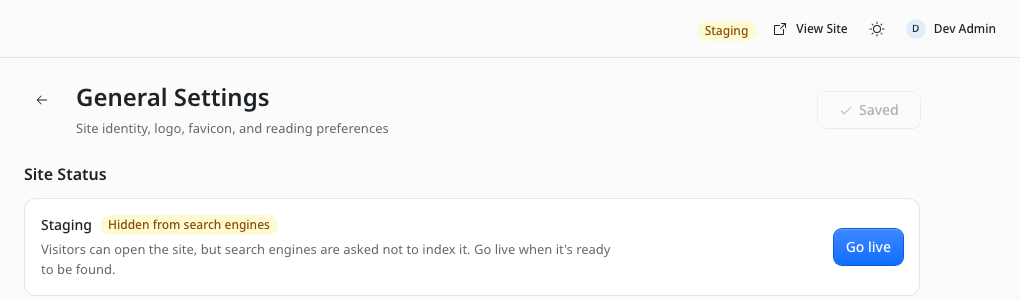
When the site is ready, select Go live in Settings > General > Site Status. You can also send { "staging": false } to the settings API, or use the MCP settings_update tool. Switch back to staging hides the site again.
Existing sites are live and don't change. Templates that don't render <EmDashHead> don't get the tag. Thanks @swissky.
Send email through any SMTP server
EmDash now has a built-in SMTP provider, so you can send email through Brevo, Office 365, Fastmail, Amazon SES or your own mail server without a plugin (#2156). It works on Node.js, and on Cloudflare Workers with the nodejs_compat flag.
Choose SMTP in Settings > Email and enter the server details. Saving them requires EMDASH_ENCRYPTION_KEY, which encrypts the password in the database. You can also set EMAIL_SMTP_HOST, EMAIL_SMTP_USER and EMAIL_SMTP_PASS, with optional port, security and sender variables. Settings saved in the admin take precedence over environment variables.
Settings > Email now has a provider dropdown listing SMTP and any installed email plugins. Send test email shows the server's error, such as a rejected login, instead of a generic failure. Port 465 uses implicit TLS, port 587 uses STARTTLS, and port 25 is refused.
Thanks @swissky. Plugins that provide email can now import their hook types, such as EmailMessage and EmailDeliverEvent, from emdash (#3600, thanks @itaides). Sign-in emails, test emails and domain-change notices now use the site title from Settings > General (#4644). The SMTP host placeholder is now smtp.example.com instead of a specific provider (#4720).
Arrange your own sidebars
Settings > Sidebars lets each user hide and reorder entries in the admin navigation, and sections in the editor's settings sidebar (#4628). Every role can open it from the user menu, a pencil at the bottom of the navigation, or the Customize sidebar link at the end of the editor sidebar. Your layout is saved to your account, so it follows you to every browser, and it doesn't change anyone else's.
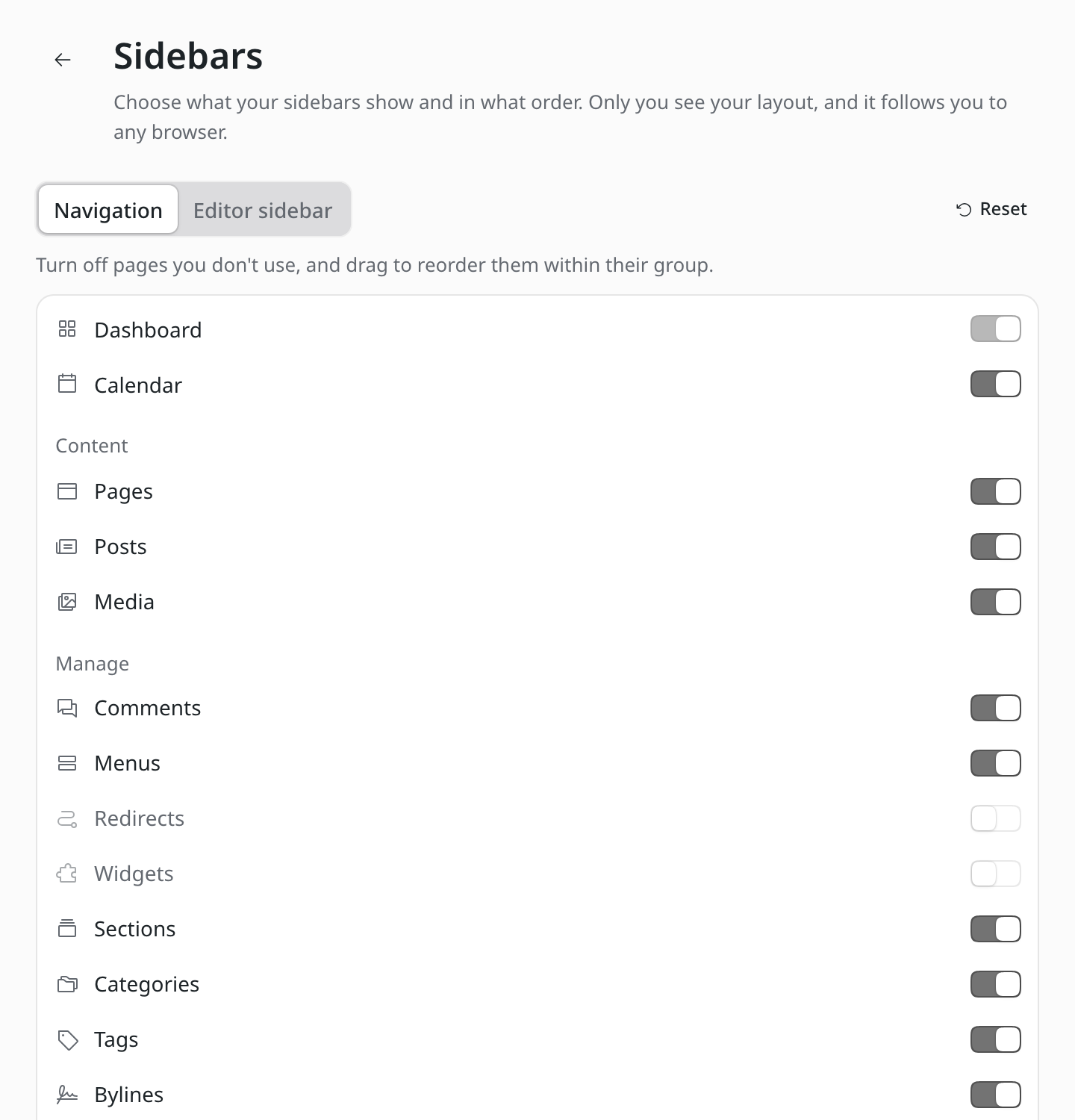
Dashboard always stays first, and Publish can move but not be hidden. Reset restores the default and offers Undo. admin.hiddenNavItems still hides entries for everyone. The drag handles on editor sidebar sections are gone, and section orders saved with them in a browser aren't carried over.
Users without a profile picture now get a colorful avatar with their initials. It is based on their user ID, so each user looks the same everywhere (#4791).
A blocks editor you can scan
blocks fields have a new editor (#4573). Blocks start closed, each showing its type, a one-line summary and a thumbnail when it has a photo. You can scan the page, then open the block you want. Each block's ⋯ menu adds a block above or below, duplicates it, moves it or deletes it. Open blocks lay out their fields in the order the page shows them, and lists inside blocks take a shape that fits what they hold, such as a table or a bulleted list.
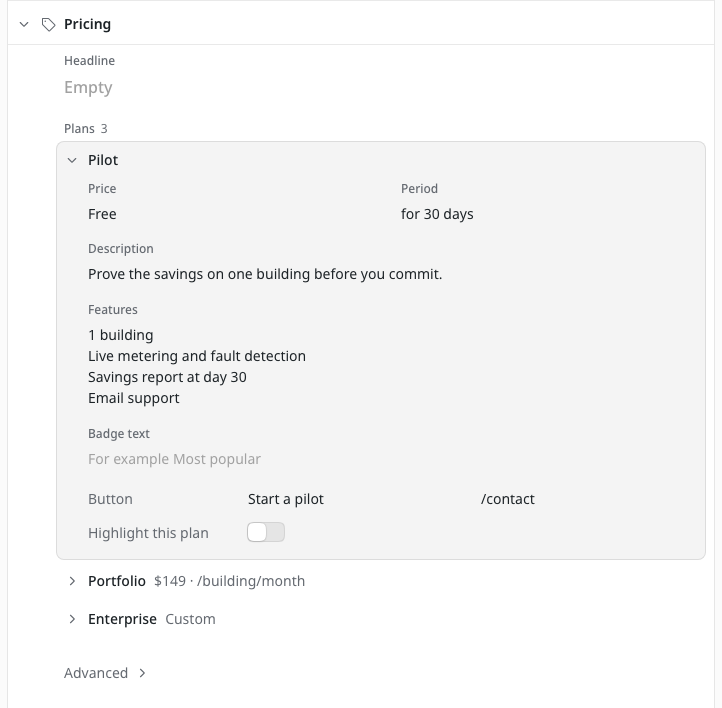
The admin also checks block fields before saving, and points to the field that needs fixing. Every site with a blocks field gets the new editor. Stored content, the API, block schemas and how sites render blocks don't change.
Buttons blocks, such as button groups imported from WordPress, can now be edited in rich text, and /buttons inserts a new group (#4595, thanks @swissky).
The admin on phones
Much of the admin has been reworked to fit narrow screens, mostly by @khoinguyenpham04:
- Dialogs have a new design, with the title in a fixed header and Cancel and the main action in a tray at the bottom (#4495). On phones they open as bottom sheets that you can swipe down. Form dialogs show what's wrong next to the field, and keep what you typed when a request fails. Notes that used to sit under fields are behind an info button, which now also opens when tapped on a phone.
- Tables fold away less important columns when there isn't room, so each row's
…menu stays on screen. This covers the content list (#4494), Users and Bylines (#4462), Content Types, Block types, Relations and Byline Schema (#4497), taxonomy terms (#4503), Comments (#4520), the Media Library list (#4527) and Redirects (#4528). They also share the content list's look. Names that open an item are buttons you can reach with the keyboard, and focus stays in place when a row leaves the table (#4537). - The content editor toolbar shows its actions in a grid on phones instead of scrolling sideways, and save failures appear in a banner under the header (#4485).
- The calendar's month view fills the window, folds extra entries into "+N more", and opens entries in a side panel or a bottom sheet (#4151). Days in the scheduling date pickers line up under their weekdays (#4585).
Modern image formats
The Image component from emdash/ui has a new formats prop (#3307, thanks @swissky). List formats in order of preference, and the component renders a <picture> with a fallback:
<Image image={post.data.featured_image} width={1200} height={675} formats={["avif", "webp"]} />fallbackFormat sets the <img> format, and quality applies to every format. formats only applies to images optimized by the site's image service. Images from external media providers keep their own URLs. Without formats, the output is unchanged. Image components no longer repeat the same URL in srcset when the image service returns the original (#4478).
Uploading images uses less server CPU (#4213). The admin sends a small thumbnail along with each upload, and EmDash makes the blurhash and dominant-color placeholders from that instead of the full image. This also gives WebP and AVIF uploads placeholders for the first time. New transparent images, including PNGs, no longer get a placeholder that shows through. A new imagePlaceholders: false option turns placeholder generation off, for sites with a tight CPU budget.
The Media Library also accepts BMP images (#3066, thanks @zaochih).
More options for content types and seeds
- Date column. A collection's
dateFieldcan now bepublishedAt,createdAtorupdatedAt, so the content list can show and sort by publication date without a duplicate custom field. Choose Date column source in the content type's settings (#4730). - No scheduling. Add
no-schedulingto a collection'ssupportsto stop editors scheduling its entries in the editor, the calendar and the API. Existing schedules still run (#4729). The oldschedulingvalue never turned scheduling off, and is now deprecated. If you left it out expecting scheduling to be disabled, addno-scheduling. - Local seed images. Seed files can use
{ "$media": { "file": "assets/photo.jpg" } }to import an image next to the seed file, instead of serving it over HTTP (#4728). Local files are read when the seed is applied with Node.js and aren't bundled for deployment. - Text field rows.
options.rowson atextfield now renders a textarea with that many rows (#4533). - Plugin panels. Content editor panels from plugins can set
isVisible(ctx)to hide themselves, for example on collections they don't apply to (#4731).
More complete WordPress imports
- WXR file imports now bring in menus, with their nesting and links to the imported pages and posts (#4666). Each author now gets one byline for the whole file, instead of a new one every 30 posts (#4601).
- Classic-editor posts keep their paragraphs instead of arriving as one long paragraph (#4602). Conversion of HTML with unclosed tags no longer takes seconds (#4635). Columns and Cover blocks render the images, buttons, galleries and other blocks inside them, not just the text (#4603). Thanks @dmythro for all of these.
- Classic-editor code blocks import as code instead of running into the paragraph around them (#3846, thanks @svermaak).
- Password-protected WordPress posts now import as drafts through the admin and the CLI, and the import lists them. Before, they were published for anyone to read (#4742). Earlier imports need checking; see the upgrade notes.
- Drafts keep their WordPress dates, so publishing them keeps date-based permalinks (#4709). Menu links to custom post types imported through the EmDash Exporter now point to the right collection (#4592). Links and images are rewritten on PostgreSQL too (#4699).
- A new
emdash import wordpresscommand converts a WXR export to JSON files on disk, as the migration guide describes. It also fixesemdash --versionreportingv0.0.0(#3765, thanks @maikunari). - The import review screen's SEO switch reads "SEO settings" instead of naming Yoast (#4305, thanks @iNerdStack).
The admin in more languages
- Ukrainian is complete, with corrected wording throughout (#4613, thanks @dmythro).
- Japanese is complete (#4558, thanks @Yusaku01).
- German covers everything new in this release (#4545, #4718, @danielmlr).
- Swedish covers the strings added since 1.2 (#4752, thanks @kegren), and Hindi fills in missing strings (#4535, thanks @CacheMeOwside).
- Croatian, Russian and Serbian counts such as 21 or 101 are no longer described as a single item (#4235). "Not found" errors (#4421) and the Atmosphere sign-in and setup forms (#4713) can now be translated.
Upgrade notes
Most sites need only the usual update. Check this list for anything that applies to yours:
- Sandboxed plugins with KV data. Plugin
ctx.kvvalues are now shared between in-process and sandboxed execution, and migration 092 copies sandboxed values into the shared store (#4277). If your site runs sandboxed plugins, including marketplace and registry plugins, don't do a rolling upgrade. Back up the database and stop every instance, and upgradeemdashtogether with your sandbox runner. Runemdash migratefrom the new build, review any conflicts it logs, then start the site. See Plugin KV storage when changing execution mode. - Plugin storage unique indexes. Plugin storage
uniqueIndexesnow apply only to the collection that declares them, and migration 095 rebuilds them (#4715). Sites with plugins that declare unique indexes need a maintenance window, because old instances still serving traffic can restore the old constraints. Follow Fixed: plugin storage uniqueness for Node.js and Workers. emdash()options are type-checked. A value of the wrong type, such asmcp: "yes", now stopsastro devandastro buildwith an error that names the option. Unknown options log a warning that suggests the closest match (#4641, thanks @swissky). Fix each option the error names.- Kumo 2.15. The admin and the Forms, Field Kit, AI Moderation and AI Search plugins now require exactly
@cloudflare/kumo@2.15.0. Updateemdashand these plugins together. Plugin admin pages should remove margin classes such asme-2fromDropdownMenuitem icons (#4308). - Menus. Deleting a menu item on SQLite and D1 now deletes its nested items too. On upgrade, migration 093 moves items left behind by earlier deletes to the top level, where the site was already showing them. Review your menus and delete any you no longer want (#4454).
- Earlier WordPress imports. Menus imported through the EmDash Exporter before this release aren't repaired. Re-add links to custom post types such as
team-memberwith Add Content (#4592, thanks @danielmlr). If you imported password-protected posts, unpublish any that should stay private. That also applies to new imports through the Exporter, which doesn't send post passwords (#4742). - Repeater rows saved empty. A row with an empty optional select or URL sub-field now saves. Entries saved that way before this release may still fail until you fill the sub-field in and clear it again (#4479).
- Sandbox subrequests. Sandboxed plugins can make 30 bridge calls per invocation instead of 10. To keep the old limit, use a custom sandbox runner (#4712).
- Browser tests. Dialogs no longer have a separate close button, so click Cancel or press Escape instead. Label locators such as
getByLabel("Slug")may also match the new info buttons, so pass{ exact: true }(#4495). The editor sidebar's "Drag to reorder" buttons are gone (#4628).
The remaining migrations run automatically with the default auto migration mode. Apart from reviewing menus after 093, they need no action. Migration 094 reindexes Used in for rich text media. Migration 096 adds revision columns, and migration 097 adds the collaborative editing room tables.
Smaller improvements and fixes
Editor and admin
- The first save of a new entry in a collection with drafts is labelled Save draft, and the sidebar explains that the entry stays a draft (#4640, thanks @swissky).
- The editor no longer saves outdated rich text over a newer version from another tab, a plugin or the API (#4418). It no longer overwrites someone else's changes after a background refresh followed by an undo, and reports a conflict instead (#4776). A manual save's refresh no longer reverts title edits (#4485).
- Rich text blocks keep the same keys from save to save, so saving the same content twice gives identical Portable Text (#4632). The editor pins Tiptap 3.32.0, fixes responsive table widths and gives its text boxes names for screen readers (#4401). Read-only rich text is announced as read-only (#4695).
- Publish now, Publish changes and Unpublish show a spinner while they run (#4759). Preview reuses an entry's open preview tab instead of opening a new one each time (#4263, thanks @henshaw). Previews follow a saved slug change (#4415), and Playground previews show the draft (#4511).
- Required file, image and reference fields no longer say "This field is required" as soon as the form opens (#4385, thanks @Stormster).
- Category and tag pickers no longer create a term when Enter confirms an IME composition (#4379, thanks @Yusaku01). The picker's create button is disabled until you type a name (#4600).
- Select sub-fields in the repeater dialog can have their choices entered and keep them on save (#4625, thanks @swissky).
- Content lists show a draft's saved changes in collections with revisions (#4734). Invalid timestamps in imported data no longer crash admin pages (#4570).
- Browser tabs show the page and site title, and editor tabs show the entry (#4733). The back button names the list with the collection's plural label (#4629, thanks @dmythro). Sidebar sections respect reduced motion (#4291, thanks @danielmlr).
- The admin picks up a changed role without signing out (#4174). Users who aren't admins see "Access denied" on admin-only screens opened by URL (#4717). Thanks @danielmlr.
- The logo chosen in Site Settings appears in the admin when
admin.logoisn't set (#3707, thanks @nozamdavid). - Upload errors in the Media Library and media picker show the server's reason (#3913, thanks @edrpls). Uploads into folders work from empty folders and retries (#4477). Image and file fields inside blocks respect their
allowedMimeTypes(#4491). Cloudflare Stream videos play in the media details panel (#4716). - Redirect groups show in the Redirects list and can be filtered (#4481).
- A plugin admin page at
path: "/"highlights in the sidebar (#3008, thanks @marks-zyz). Config-registered plugins show their name and description (#2817, thanks @scottbuscemi). Sandboxed editor panels show progress during slow actions (#4413). - Change domain explains when it can't verify a domain, such as a Workers Custom Domain (#4510). Settings > Transfer resumes an interrupted import and explains how to retry a failed cleanup (#4708).
- The AI Moderation category dialogs have a background (#3014, thanks @DavidPivert). Block Kit charts no longer log console errors in development (#4390, thanks @danielmlr).
Sites and content
- The Categories, Tags, Recent Posts and Archives widgets show the page's own language (#4604, thanks @dmythro). Widgets, sitemaps,
robots.txtandhreflanglinks include an Astrobase(#4589, #4591, thanks @swissky). - The default SEO title uses the collection's
titleField(#4534). JSON-LD nodes have@ids, so other graphs can reference them (#3019, thanks @marcin-misiewicz-pl). Site logos, favicons and social images use the storagepublicUrl(#4284, thanks @devondragon). - Redirects match source paths with non-ASCII characters (#4615). Slug-change redirects keep trailing slashes (#4697). Thanks @swissky. Draft slug changes no longer create redirects (#4445). Redirect writes recover a missing lock row (#4366, thanks @cameronapak), and a slow redirect write can no longer land after a newer change (#4539).
- Embeds from hosts other than YouTube and Vimeo render as a link instead of an empty frame (#4696, thanks @swissky).
Embedonly treats real YouTube and Vimeo URLs as videos (#4553). Bluesky embeds no longer crashastro devon Cloudflare (#4254, thanks @swissky). - Portable Text links render their
title(#4598, thanks @onetogregorio).CommentsandCommentFormlook right in dark mode (#4575, thanks @disney2002).<LiveSearch>arrow keys and Escape work after a result has focus (#4563, thanks @saariuslystoned). - Approving, moderating or deleting comments clears cached pages (#4460). Visual editing publishes every changed entry on the page (#4484).
- Search reports
503 SEARCH_UNAVAILABLEon Node.js builds whose SQLite lacks FTS5, instead of returning nothing (#4398). - Used in finds rich text media referenced by file URL (#4326). Markdown imports keep nested formatting and list depth, and import tables as table blocks (#4607). Seeds assign taxonomy terms in the entry's own locale (#4417).
- Long generated slugs that are already taken get a numeric suffix on D1 for entries (#4542) and taxonomy terms (#4098, thanks @marcodangelo). Long taxonomy filters no longer hit D1's parameter limit (#4581).
- A scheduled entry that fails to publish is unscheduled and listed on the dashboard with the error (#4782, thanks @eisenbruch).
- Backups and preview snapshots stay under D1's new 50 MB result limit (#4610, thanks @swissky).
Speed
getEmDashCollection()with several taxonomy filters starts from the smallest one (#3266), andwhere: { id: [...] }uses the primary key on SQLite (#3916). The first request on a new server instance loads less code (#4596). Thanks @eisenbruch.- Byline custom fields load once per request (#4631, thanks @swissky) without a separate schema query (#4727). Untagged entries no longer query their terms again (#4088, thanks @mateusz-zadorozny).
kvCache()usually reads one key to revalidate a page (#4079), and the scheduled-publishing sweep skips collections with nothing due (#4560). Thanks @marcodangelo.- Cold starts in
automigration mode check migrations in the same D1 round trip (#4172, thanks @cyface). Public pages skip session reads for visitors without a session cookie (#4726). Plugin admin stylesheets no longer load on public pages (#4482). - Sites with an
objectCacheno longer serve an old version of an entry after an update under load (#4651, thanks @viktor-kryzhanovsky). Widget edits finish their cache update before purging pages (#4531).
Plugins
- Plugins configured with
sandboxed: [], including withsandbox: false, now runplugin:installandplugin:activateon first boot (#4358). A failedplugin:activateleaves the plugin disabled (#4403). - Workers no longer fail intermittently at startup with
VALID_HOOK_NAMES_SET(#4353). Several sites on one host can run sandboxed plugins (#4665).astro devrestarts no longer leave stale runtimes behind (#4476), or reload the admin on the first visit (#4593, thanks @swissky). - Sandboxed
ctx.content.delete()moves entries to Trash (#4668). Plugin routes called through MCP and editor panels receive client IP and geo data on Cloudflare (#4702). State-changing plugin routes wait for storage indexes (#4095). - Registry installs no longer fail while a newer package profile awaits review (#4557). Registry search matches slugs and publisher handles (#4370, thanks @danielmlr). Delegated releases upload icons, banners and screenshots (#4467).
emdashPluginTest()resolves room support (#4668). - Forms: the form editor has controls for digests, autoresponders, webhooks, conditions, placeholders, help text and defaults (#4466). The autoresponder uses the submitter's own email field (#4505, thanks @eisenbruch). Submissions open on the latest form (#4521), and only admins see controls that need admin rights (#4762). Phone numbers can start with
(, such as(555) 123-4567(#4552). The Required checkbox lines up with its row (#4544, thanks @danielmlr). Submitted values no longer come back on the next page (#4488), and screen readers no longer hear an English "required" (#4489). Thanks @Chiji1108. - AT Protocol: re-syndication saves the document before updating the Bluesky post (#4704), and featured images appear as covers and link-card thumbnails (#4707).
MCP, API and CLI
- API tokens can manage redirects with
content:readandsettings:manageinstead ofadmin. Reading the 404 log needssettings:read(#4061, thanks @eisenbruch). - MCP
content_updatesays when it saved fields before a publish conflict, and returns the new_rev(#4668). MCPsettings_updaterejectsrobots.txtsettings on sites with their ownsrc/pages/robots.txt(#4694, thanks @swissky). EmDashClientkeeps original dates oncreate(),update()andpublish()(#4340), and itsMediaItemtype matches the API (#4339). Thanks @Chiji1108.emdash/uiand Portable Text types resolve from package declarations (#4660, #4662).emdash schema delete --forcedeletes collections with content (#3016, thanks @jakevis).emdash migrateon D1 explains how to choose a database (#3115, thanks @dchaudhari7177).emdash loginsuggests a working command behind Cloudflare Access (#4237, thanks @danielmlr).- The CLI keeps each site's credentials when you sign in to several at once (#4703). It works with local dev servers behind an external auth provider (#4705). Dev authentication no longer blocks the setup wizard (#4711).
Sign-in and deployment
- OAuth on Node.js reads provider credentials set at runtime (#4289, thanks @Antonio-Bennett). Cloudflare Access logins without groups, such as one-time PINs, get
defaultRolewhenroleMappingis set (#4555). A failed local user lookup after external sign-in returns503instead of401(#4619, thanks @swissky). - Passkey login and invites work when middleware adds trailing slashes to API URLs (#4526, #4508).
- Zod is updated to 4.6.7, clearing an
npm auditwarning. Update EmDash and any plugin tooling to get it (#4483).
The same release commit updates @emdash-cms/admin, @emdash-cms/auth, @emdash-cms/auth-atproto, @emdash-cms/blocks, @emdash-cms/cloudflare, @emdash-cms/gutenberg-to-portable-text, @emdash-cms/plugin-cli, @emdash-cms/plugin-test, @emdash-cms/plugin-types, @emdash-cms/registry-lexicons, @emdash-cms/registry-loader, @emdash-cms/sandbox-workerd and the AI Moderation, AI Search, AT Protocol, Audit Log, Embeds, Field Kit and Forms plugins with the changes above. @emdash-cms/registry-client and @emdash-cms/registry-verification have dependency-only updates, and create-emdash and @emdash-cms/x402 received matching 1.5.0 tags with no changes.
Thanks to the 34 community contributors who worked on this release alongside the core team.
Read the complete emdash@1.5.0 release, then follow Update EmDash to back up, build, deploy and verify the site. If your site runs sandboxed plugins or plugin storage unique indexes, read the upgrade notes first.