EmDash 1.4: fewer lost edits and many small refinements
Edits are saved before you leave the editor, you can hide the admin areas you don't use, the editor and admin get dozens of small fixes, and the admin is complete in three more languages.

EmDash 1.4 is a release of refinements. Two weeks after 1.3, it brings 75 changes from 22 contributors and our own EmDash Bot! Most of them fix or smooth out something you already use, rather than adding something new.
The most important ones are about not losing work. Edits you've just typed are saved before you leave the editor, two saves of the same version no longer silently overwrite each other, and menu changes on D1 save completely or not at all.
You can also hide the admin areas your site doesn't use, the editor spaces blocks evenly, and the admin is now complete in Simplified Chinese, Brazilian Portuguese and Turkish. There are no database migrations. If you rely on HTTP caching headers or write sandboxed plugins, read the upgrade notes first.
- Fewer lost edits
- Hide admin areas you don't use
- Editor refinements
- Admin refinements
- The admin in more languages
- Fewer database queries and writes
- Plugin updates
- Upgrade notes
Fewer lost edits
Several fixes in this release, most of them from @danielmlr, close gaps where saved work could disappear.
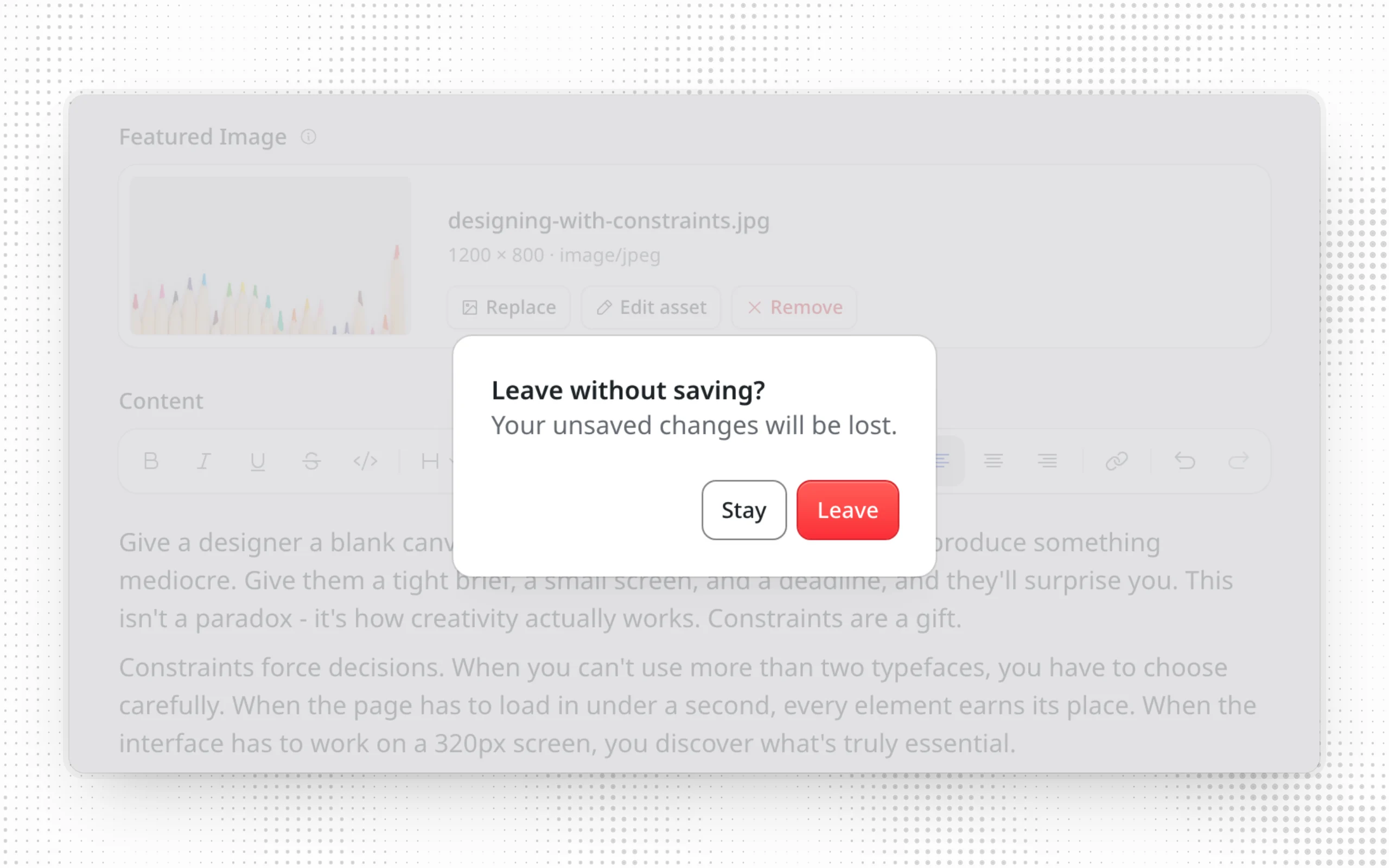
- Leaving the editor right after typing. Edits to an existing entry were lost if you followed a link before autosave ran. The editor now sends them before leaving, and the next page shows "Autosave failed" if they don't go through. If they can't be sent at all, for example after a conflict, the editor asks before you leave. Reloading or closing the tab with unsaved edits shows the browser's prompt (#4298).
- Switching entries while autosave is running. Switching to another entry and back could bring back an older copy that overwrote your latest edits. The autosaved edits are now kept (#4298).
- Two saves at once. When two saves of the same entry were based on the same version, for example from two MCP clients or from scripts using
emdash content update --rev, both reported success and the first was silently overwritten. On D1, Durable Objects and PostgreSQL, the second save now returns409 CONFLICT, as a save based on an outdated version already did (#4286). - Menus on D1. Translating a larger menu failed partway and left an empty translated menu behind. On D1, translating or deleting a menu and reordering or replacing its items now save completely or leave the menu unchanged (#4364).
Hide admin areas you don't use
Not every site uses comments, redirects or widgets, but the admin sidebar always listed them. The new admin.hiddenNavItems option, from @swissky, hides the built-in areas your site doesn't need (#3856):
emdash({
	admin: {
		hiddenNavItems: ["comments", "redirects", "widgets"],
	},
});
It accepts calendar, media, comments, menus, redirects, widgets, sections, bylines and import. Hidden areas disappear from the sidebar and the command palette. Hiding media also removes the dashboard's Upload Media button, and hiding calendar keeps the dashboard's Scheduled count but drops its link to the calendar. An unknown name fails the build.
Hiding an area only removes the links to it. The pages and API routes stay the same, so anyone with the URL and the required role can still open them.
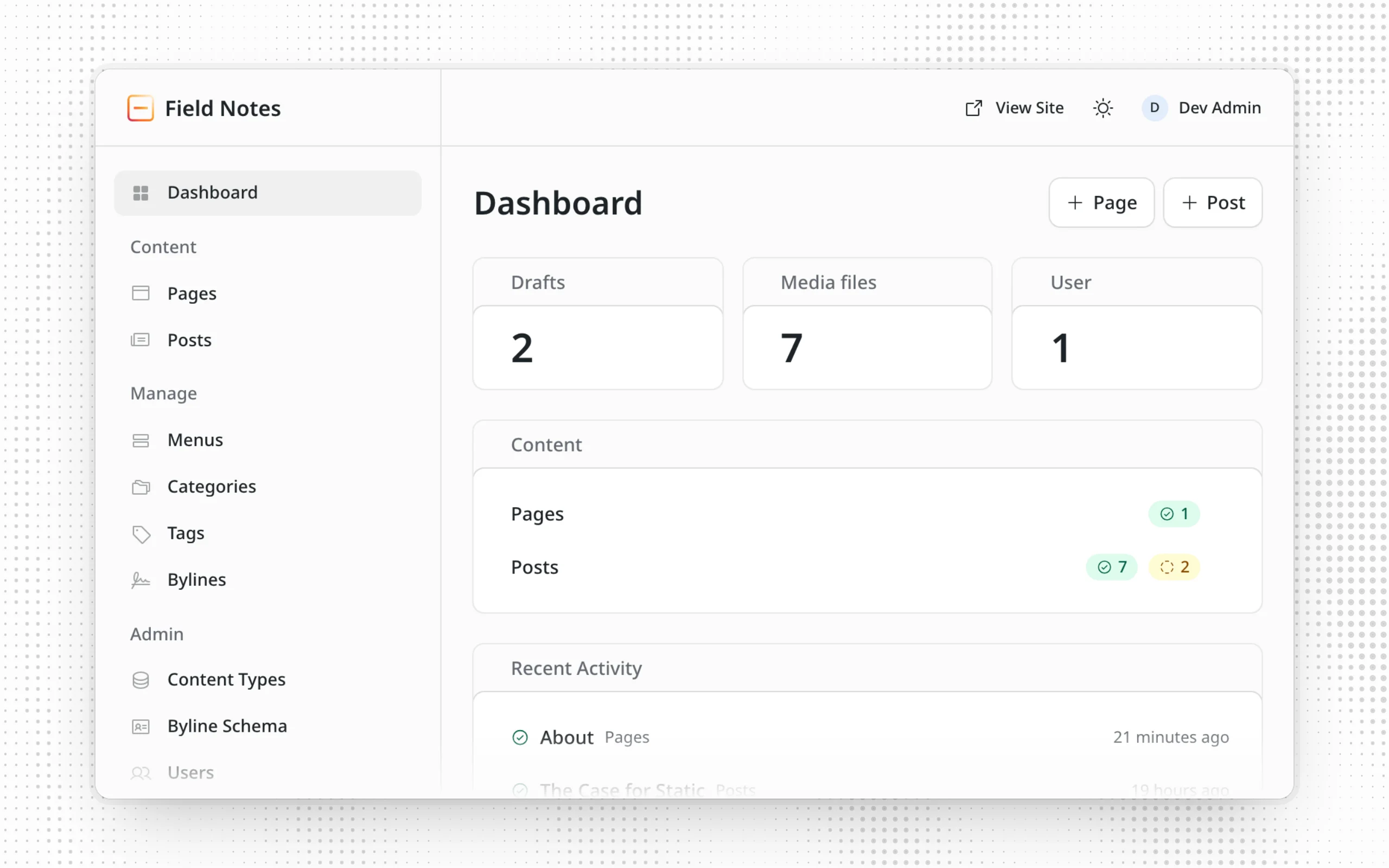
Collections marked Hide from navigation are now also left out of the dashboard's Content card, matching the sidebar (#4096, thanks to @masonjames).
Editor refinements
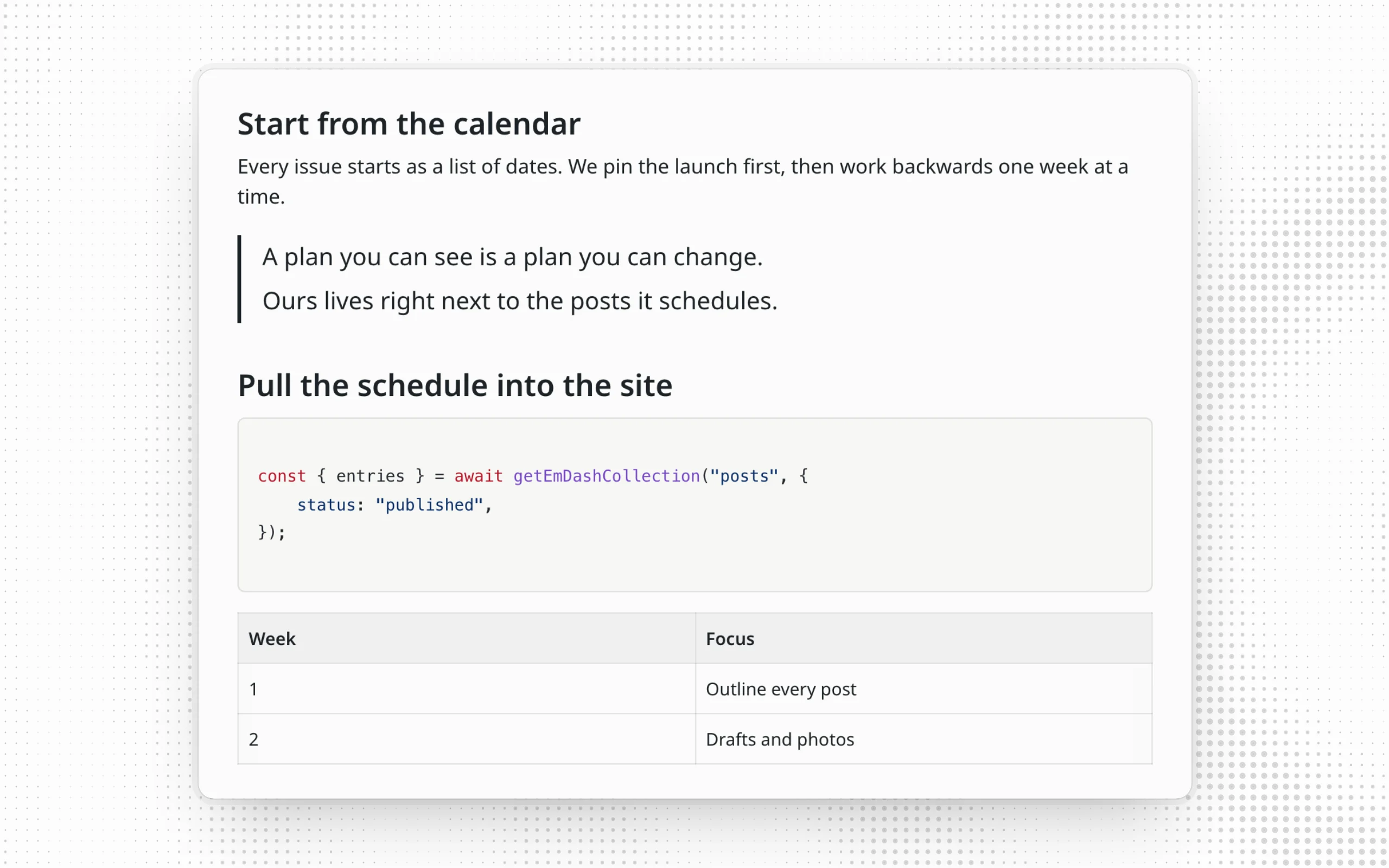
The rich text editor now spaces blocks evenly. Quotes, code blocks, images and tables keep the same space around them, and a heading sits close to the block it introduces. Images and videos no longer show an empty caption line. To add a caption, select Add caption in the image toolbar or among a video's corner buttons, or press Tab from the selected block. A quote of several paragraphs stays one block after you save and reopen the entry (#4160).
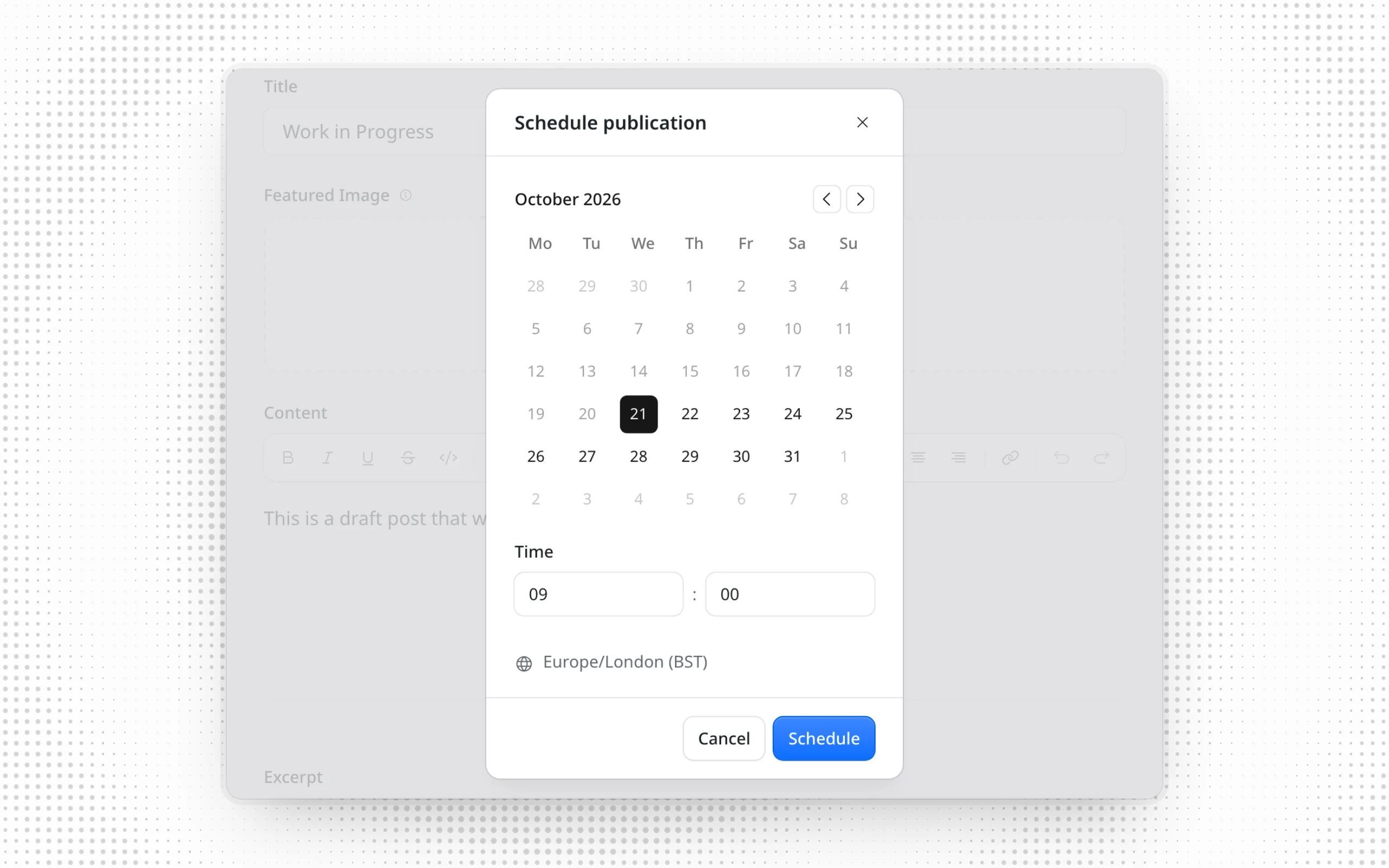
The scheduling dialog now opens with the next whole hour selected, and explains what to change when the date or time is missing or invalid, instead of the Schedule button appearing to do nothing. The publication date dialog shows its errors too, and in right-to-left languages the time fields read hour then minute (#4307).
More fixes in the editor:
- The cursor stays in place while you type in the middle of an image or video caption (#4368, @eisenbruch).
- Saving with an optional date and time field left empty or cleared no longer fails with "Invalid input", including in new repeater rows (#4425).
- Slugs are generated from the collection's title field rather than from any field named
title. In a collection whose title field isname, two people with the same job title no longer collide (#4386, @Stormster). - Arrow keys, Escape and Shift+Tab work in the floating toolbars again with Tiptap 3.20.3 and later (#4396).
- Inserting a table at the end of a post, and the "List" and "Quote" hints on empty blocks, work again with
@tiptap/extensions3.27.3 and later (#4395). - The OG Image preview resolves SEO images stored as bare media IDs, warns that the ID may not work in shared links, and offers Save image URL to replace it (#4302).
Admin refinements
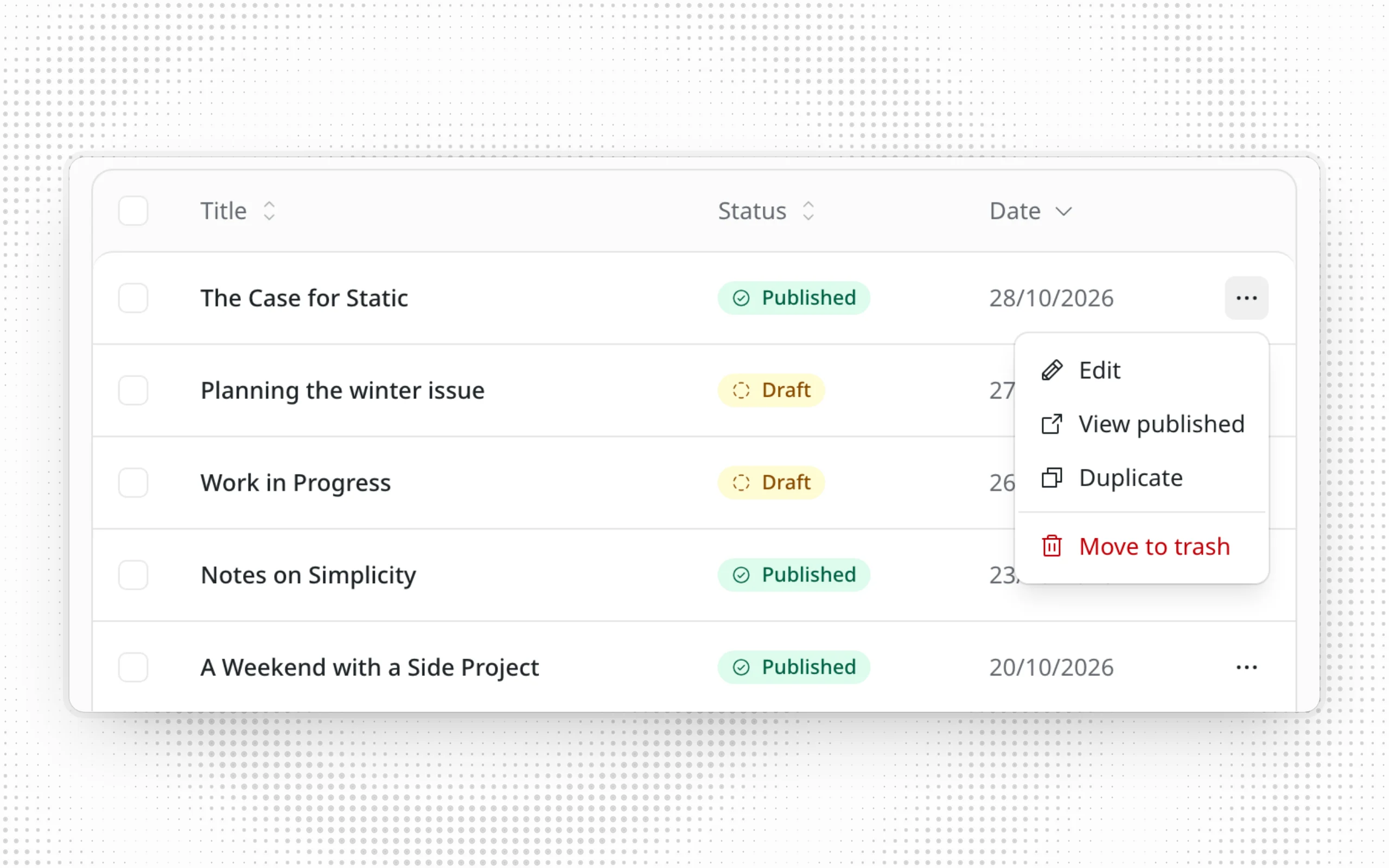
Each row in the content list now keeps its actions in one … menu. On the All tab, the menu has Edit and Move to trash, plus View published for published entries and Duplicate where you can duplicate. On the Trash tab, it has Restore and Delete permanently. Clicking an entry's title still opens it, and confirming Move to trash or Delete permanently now closes the dialog right away (#4446).
Smaller changes across the admin:
- Deleting a menu item or widget asks for confirmation first, as deleting a whole menu or widget area already did (#4434).
- Failure toasts use the error style instead of the neutral one (#4303).
- Unknown admin URLs show the admin's Page Not Found page, with a link to the dashboard, instead of a bare "Not Found" line (#4433).
- The setup wizard and the first-login welcome dialog show the configured
admin.logoandadmin.siteName, for example "Welcome to Acme, Alice!" (#4315, #4165, @h3xexe).
The admin in more languages
The admin is now complete in three more languages:
- Simplified Chinese, where about half of the strings were still in English (#4124, @otscup)
- Brazilian Portuguese, with 1,170 newly translated strings, including the publishing calendar and site transfer (#4037, @marks-zyz)
- Turkish (#3572, @logelog)
Japanese gains translations for the editor, publishing, media, sign-in, setup, site transfer, menus and settings, in four PRs from @Yusaku01 (#4260, #4382), @Chiji1108 (#4338) and @urmshr (#4452).
Dutch (#3571, @logelog), German (#4210, #4355, @danielmlr), Hindi (#4354, @CacheMeOwside) and Indonesian (#4356, #4322, @Zahid09987) are updated too.
In right-to-left languages such as Arabic, slugs, URLs, paths, URL and regex patterns, and email addresses now read left to right in fields and tables, while the labels around them stay right-to-left. Before, the URL pattern /blog/{slug} appeared as blog/{slug}/ (#4299, @MA2153).
![The redirects table in Arabic, with /about?ref=old and /old-blog/[slug] reading left to right inside the right-to-left table](/_image?href=https%3A%2F%2Femdashcms.com%2F_emdash%2Fapi%2Fmedia%2Ffile%2F01M63VC86CAGV2GF889QZCADMN.01M63VC9ZQRGS65HDCKBM8DPA1.png&w=2560&h=1600&f=webp&fit=cover&position=center)
Fewer database queries and writes
- With an object cache configured, widget areas are now cached, so
<WidgetArea>and the widget helpers no longer query the database on every page load. Changes from the admin, seeding or a site transfer clear the cache. Code that writes the widget tables directly should call the newinvalidateWidgetObjectCache()(#3596, @swissky). - Sites with byline custom fields, or with entries that have an author but no explicit byline, now resolve bylines from the content query itself. On D1, a page that reads a few entries saves two to six sequential queries (#4167, @cyface).
- External auth providers such as Cloudflare Access no longer write the session store on every admin request. On Cloudflare, that was one Workers KV write per request, which could exhaust the Free plan's daily write limit (#4157, @opariffazman).
- The Cloudflare image endpoint stops reading from R2 when it answers
304 Not Modified, answers aHEADrequest, or fails to transform an image (#4186, @swissky).
Plugin updates
Forms
The Forms plugin, now at 0.2.12, gets a round of fixes:
- Editors can now view forms and their submissions instead of seeing "Failed to load forms". Changing or deleting forms and submissions, the export and the webhook URL stay admin-only (#3373, @marks-zyz).
- Replying to an instant notification email now reaches the person who submitted the form, because the email sets Reply-To to the form's email field. The daily digest is unchanged. On sites that set
replyToon the Cloudflare email provider, these replies now go to the visitor instead of that address (#4144, @marccardinal). - Required select fields without a default no longer preselect their first option, so visitors must choose one. The empty option shows the field's placeholder (#4345, @Chiji1108).
- Empty textareas start empty instead of containing indentation from the component source (#4078, @Cloud-Xero).
- Custom submit button labels no longer reset to "Submit" after a submission (#4377).
- The Submissions page no longer shows an earlier selection's submissions when you switch forms or filters while a list is loading (#4295).
AI Search
@emdash-cms/plugin-ai-search is a new plugin from @ttmx that indexes published content and author profiles into Cloudflare AI Search, keeps the index current as content changes, and adds an AiSearch component with a search button and modal (#4071, #4310). It connects through a Workers binding, or through the Cloudflare REST API on any platform, including Node.js. You choose what to index in a setup wizard in the admin.
The AI Search guide covers installation, rate limits and switching from aiSearch in @emdash-cms/cloudflare/plugins. Both register as ai-search, so remove the older plugin first.
Upgrade notes
Caching headers
Pages that use EmDash cache hints no longer send an automatic Last-Modified header. Cloudflare answered 304 Not Modified based on that entry timestamp, which kept pages stale after related content was deleted or unpublished (#4243).
cacheHint.lastModifiedis no longer filled in automatically. For an entry's displayed modification date, useentry.data.updatedAt.- Pages that relied on it also lose Astro's implicit
Cache-Control: no-cacheheader. Set your ownCache-Controlif browsers must check on every visit. For conditional requests, pass your ownlastModifiedhint toAstro.cache.set(), with a timestamp that advances whenever anything on the page changes.
Sandboxed plugins on Cloudflare
Sandboxed plugin calls such as ctx.content.create(), ctx.taxonomies.createTerm(), the versioned content actions and ctx.comments.setStatus() now work when requests run across several Worker isolates (#4394). Their connection lasts only for the current invocation, so await these calls before returning from a route or hook. In runtime-host tests, call await host.waitForDeferredTasks() after an action before you check its after-hook effects.
Plugin tooling
emdashPluginTest()no longer writes to the plugin'sdist/directory. Runemdash-plugin buildseparately if you need build output after testing (#4273).emdash-plugin initnow scaffolds plugins against EmDash 1.x. To move a plugin scaffolded earlier, setemdashto^1.0.0and@emdash-cms/plugin-testto^0.2.6in itsdevDependencies(#4290).
Content list browser tests
Tests that clicked a row's own buttons, such as "Edit My post", need to open the "Actions for My post" menu first (#4446).
Empty image and file fields
A blank image or file field, including one inside a repeater, now saves as null instead of an empty external image. A required image or file field returns a validation error for "". This only affects API, MCP and import clients, because the admin never sends "" (#3129, @eisenbruch).
Repairs after upgrading
- Collections with a reference field named
titleornamerecorded no media usage when entries were saved (#4296). After upgrading, open Settings → Media usage tracking and wait until it shows Ready. If it shows Needs attention, repair each affected collection:
npx emdash media repair-usage --collection <collection>- Collections with a reference field marked searchable failed to create or save entries with
no such column(#4205). If that still happens after upgrading, open the collection under Content Types, untick Search and save, then tick it again and save. - On D1, if translating a menu failed before, delete the empty translated menu it left behind and translate the menu again (#4364).
Smaller improvements and fixes
Content
- Content list search no longer fails in collections with a reference field named
titleorname(#4208). - Unregistered blocks without a URL, such as imported WordPress buttons, show a notice instead of offering URL editing (#4314).
- An entry's terms refresh after a plugin editor panel asks for a refresh, so later sidebar edits keep terms the plugin added (#4271).
- Term creation dialogs no longer keep the previous term's values when reopened (#4427).
- The visual editing toolbar's "Open in admin" opens a separate admin window for each entry (#3279, @eisenbruch).
Admin
- The Plugins page reads "1 plugin", and the SEO settings heading is now "Search Engine Verification" (#4435).
- The admin stylesheet no longer overrides body colors and dialog sizes when it loads on a public page (#3867, @masonjames).
- Plugin panels in the editor respect the reduced-motion setting (#4185, @masonjames).
- Untranslated plugin labels no longer fill the console with "Uncompiled message detected!" warnings (#3130, @eisenbruch, and #4388).
Menus
getMenu()leaves out items that link to trashed or unpublished entries, together with their child items. With the object cache, a menu refreshes when an entry or term it links to changes (#4285).- Creating a child menu item through the API without a
sortOrderworks on PostgreSQL (#4365).
Media and forms
- Media downloads are named after the uploaded file, including non-ASCII names (#3192, @bazemoreb).
- The Forms submissions API returns submitters' IP addresses, user agents and referers to Admins only (#4294).
Caching and sign-in
- Cloudflare-cached pages update after content is deleted or unpublished; see Caching headers (#4243).
- Taxonomy definitions revalidate in the background after 30 seconds, so long-running servers pick up changes saved elsewhere (#4243).
- Scheduled cleanup deletes expired OAuth tokens and unused login codes from
emdash loginand MCP clients (#4287). - The OAuth token endpoint returns the standard
invalid_granterror code, so OAuth clients can restart authorization (#4459).
Import and transfer
- WordPress custom post types with a hyphen in their name, such as
team-member, import through the EmDash Exporter plugin (#3890, @swissky). emdash site importno longer fails withCOLLECTION_EXISTSwhile a deleted collection's cleanup is still pending (#4380).
Plugins and builds
sandbox()works in projects with acloudflare.config.ts, without needing Wrangler (#4278, @swissky).- Sandboxed plugins with the
email:sendcapability can send mail on Cloudflare Workers (#4281). - Plugin builds bundle helpers imported from
emdash/client, such asportableTextToMarkdown(#4182, @masonjames). - Block Kit form blocks render as groups of fields, so they no longer nest HTML forms inside the content editor (#4183, @masonjames).
emdashPluginTest()no longer fails intermittently when test files run in parallel (#4273).- Site builds work with dependencies that default-import
use-sync-external-storeshims, such aszustand/traditional(#4276).
Upgrade
Run the upgrade tool:
npx upgrade-emdash@latestOr update the packages yourself with pnpm up --latest emdash, along with any @emdash-cms packages you use.
Database migrations: none in this release.
See the full release notes on GitHub and the configuration reference.