EmDash 1.3: readable revision history and a better inline editor
See exactly what changed in each saved version, edit on the page with the admin's toolbar and image picker, ask AI crawlers not to train on your site, and get faster pages on Cloudflare D1.

EmDash 1.3 shows you who changed what, and when. Nine days after 1.2, it brings 87 changes from 16 community contributors and the core team.
EmDash has kept revision history with one-click restore, since the beginning. But the interface didn't make it easy to use: the Revisions panel showed changes as raw JSON, and didn't say who made them. Now each saved version opens in the editor, with its changes marked and its author named. Editing on the page has caught up with the admin editor, and a new SEO setting asks AI crawlers not to train on your content.
Pages on Cloudflare make fewer database round trips, Contributors can finally save their own drafts, and WordPress imports keep much more of the original site. All of this on top of the usual load of reliability and bug fixes.
Highlights include:
- See what changed in each version
- The admin editor's tools, on the page
- Ask AI crawlers not to train on your site
- Fewer database round trips on Cloudflare
- Contributors can edit their drafts
- More complete WordPress imports
- The admin in more languages
- Upgrade notes
To update, run this from the project directory:
npx upgrade-emdash@latestOr update by hand:
pnpm up --latest emdash
# or if you are using Cloudflare
pnpm up --latest emdash @emdash-cms/cloudflare
Keep emdash and @emdash-cms/cloudflare on the same version. From this release, astro build and astro dev warn when they differ, and print the command to fix it (#4058).
Database migrations: none in this release. No numbered core migration was added or changed between 1.2.0 and 1.3.0. Read the upgrade notes before deploying: a few changes affect plugin MCP tool names, bylines and custom admin hosts.
See what changed in each version
Selecting a version in the Revisions panel now shows it in the editor itself, read-only. Added text is highlighted and removed text is struck through, in a color for each person who saved a version.
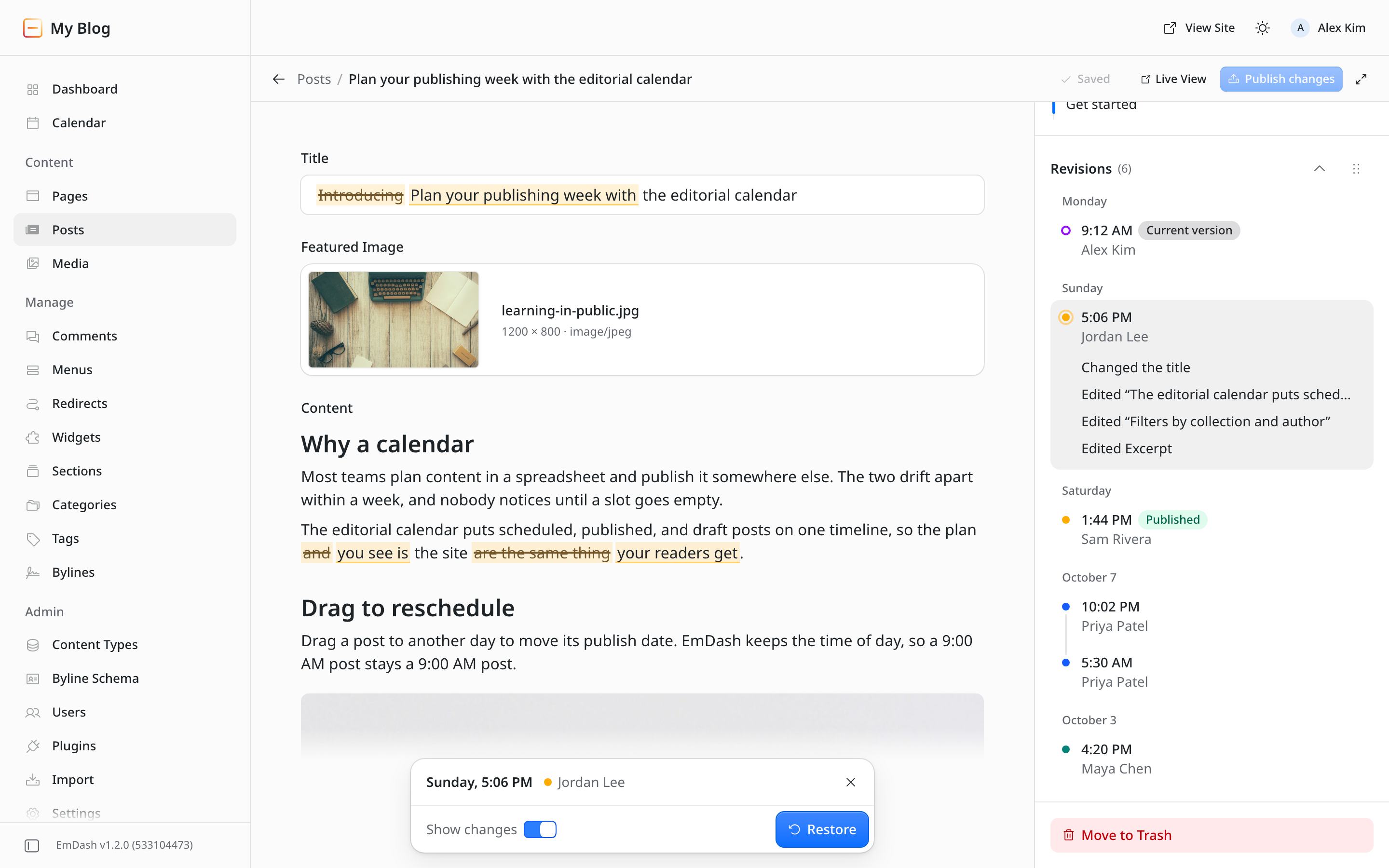
The panel lists who saved each version, and the selected version lists its changes in plain words, such as "Changed the title". Selecting one scrolls to it. Restore is in a bar at the bottom of the editor, and a version that matches an earlier one is marked "Restored from" with that version's date. Save and Publish pause while you look at an older version, and anything you hadn't saved is still there when you go back.
The revisions API (GET /_emdash/api/content/{collection}/{id}/revisions) and the MCP revision_list tool now include each revision's author as { id, name }, so editors without access to user management can see who saved each version. Custom admins that render ContentEditor with an onRevisionRestored callback may need a small change; see the upgrade notes.
This shipped in #4136. Thanks @khoinguyenpham04, who built it along with more than 20 other changes in this release.
The admin editor's tools, on the page
Visual editing lets you edit rich text directly on the site. Its editor now works like the redesigned admin editor from 1.2 (#4117):
- Selecting text shows the admin's toolbar: Turn into, link, bold, italic, underline, strikethrough, inline code, and a More menu with subscript, superscript, alignment and Clear formatting.
- With the cursor in a link, a bar shows where it goes, with buttons to edit or remove it. Clicking a link no longer opens it in a new tab, and typing a bare domain such as
example.comlinks tohttps://example.com. - The slash menu groups its commands, shows each one's Markdown shortcut, and matches as you type, so
/blfinds Bullet List. Headings 4 to 6 can be found by name and show at their own size. - Both menus follow the system's light or dark theme.
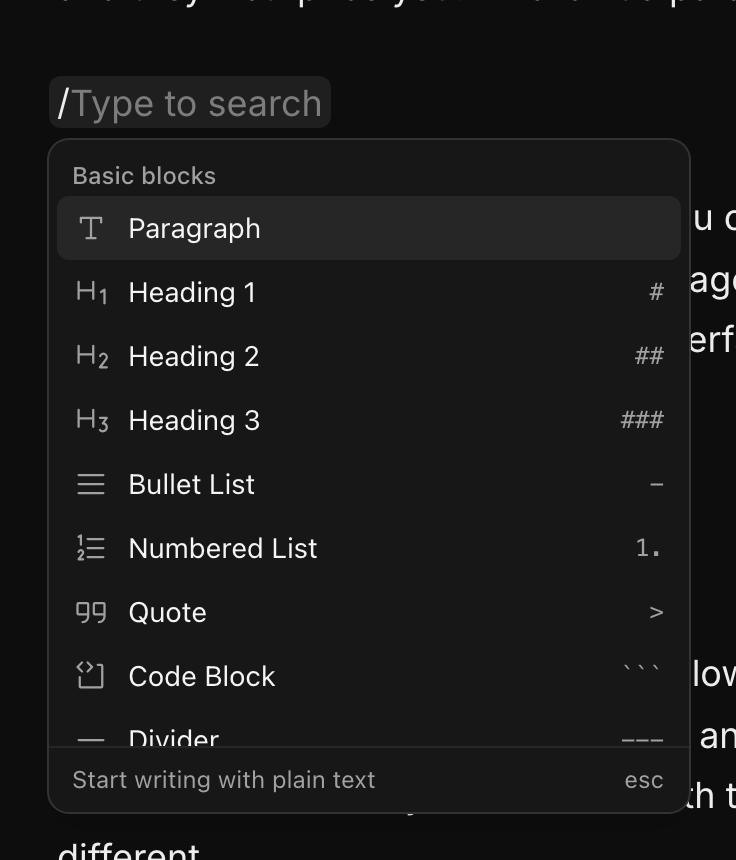
Images work like the admin too (#4137). Typing /image opens a picker below the line, showing the Media Library nine images at a time, with a tab for each media provider the site uses. Images show as they will publish, with their alignment and a caption field underneath. Selecting one shows a toolbar to replace it, edit its alt text or delete it.
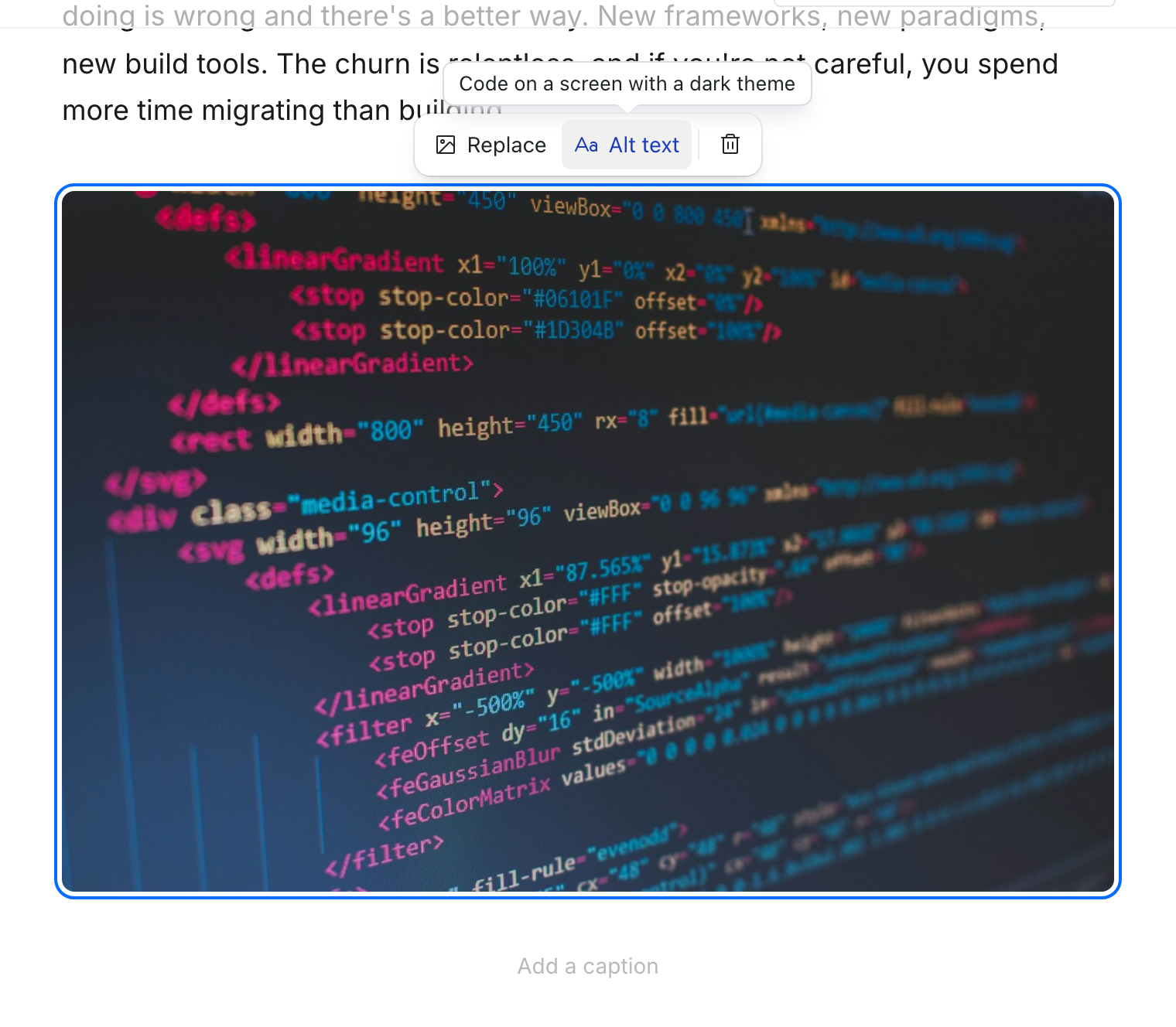
The picker on the page doesn't upload. To use a new image, upload it to the Media Library first, then choose it with /image. When the library is empty, the picker links to it.
Other visual editing fixes:
- Empty rich text fields, such as the body of a new post, can now be edited on the page. Before, they had no editor at all (#3942).
- Saving on the page no longer adds a revision every time you click away. Saves replace the pending draft revision, like the admin's autosave (#3942).
- Clicking a text field puts the cursor where you clicked, instead of selecting the whole value so that the first keystroke replaced it (#4014).
- An image inserted in a quote or list is placed after it. Before, saving dropped it.
All of these are from @khoinguyenpham04.
Ask AI crawlers not to train on your site
Settings > SEO has a new Disallow AI training switch (#3623). When it is on, /robots.txt disallows the AI training crawlers Amazonbot, Applebot-Extended, Bytespider, CCBot, ClaudeBot, Google-Extended, GPTBot and meta-externalagent, and adds a Content-Signal: search=yes, ai-train=no line. Search engines are unaffected.
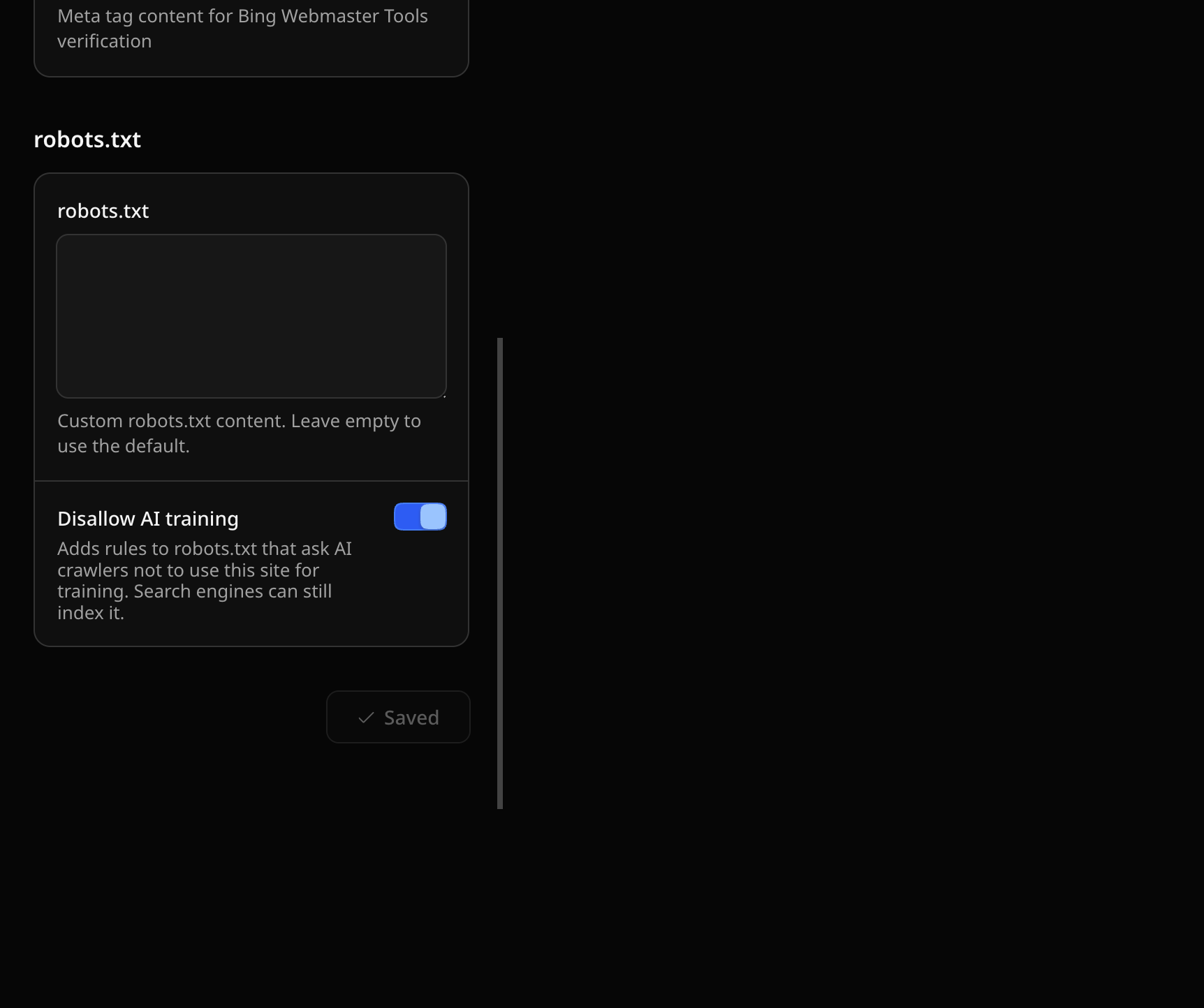
The rules are added to both the default and a custom robots.txt. The setting is off by default, so your robots.txt doesn't change until you turn it on. It is also available as seo.disallowAiTraining in the settings API and the MCP settings_update tool. Like everything in robots.txt, these rules are a request that crawlers can ignore. Thanks @swissky.
Fewer database round trips on Cloudflare
On D1 with session: "auto" or "primary-first" and no coalesce, pages load faster for logged-out visitors (#3937). A D1 session runs a request's queries one at a time, so EmDash's preload of settings, menus, widget areas and taxonomy terms held up the page's own first query. In that setup EmDash no longer preloads them, and runs those queries only when a page uses them. Sites with coalesce: true keep the preload, batched into one round trip.
New Cloudflare sites from the templates now turn on sessions and coalesce, so reads issued together share one D1 round trip, with or without read replication. To do the same on an existing site, update the d1() call in astro.config.mjs:
database: d1({ binding: "DB", session: "auto", coalesce: true }),coalesce does nothing without a session mode. It is experimental: a read and a write started at the same time may run write-first, so await a read before a write that must not affect it.
Other speed and caching changes, several of them from @swissky:
- Pages with comments run one query instead of two when all approved comments fit on one page (#3907).
- The first request after a cold start makes up to two fewer database round trips on sites with the plugin marketplace or registry (#3584).
- Creating or duplicating an entry no longer purges cached pages on sites with a route cache such as Workers Cache, because a new draft isn't on any public page (#4128).
- A new or changed redirect now takes effect for pages already in the Workers Cache (#3982), and the route cache no longer stores the old page at a redirect's source when a Worker hasn't yet loaded the new rules (#3997, thanks @bimsonz).
- A save no longer reports an error when the cache provider fails to purge after the change was saved. The failed purge is logged instead (#3987, thanks @danielmlr).
See Read replicas for setting up D1 sessions.
Contributors can edit their drafts
Contributors could create an entry, but the next save, the entry lock and setting categories or tags all failed with a 403. They can now edit their own entries while they are drafts, in the admin, the REST API and the MCP content_update tool. They still can't edit published or scheduled entries, or publish (#4133). This uses a new content:edit_own_drafts permission, held by Contributor and every higher role. No other role's permissions change.
The dashboard also now works for users who can't read drafts, such as Subscribers. Recent activity and collection counts include only published entries, and scheduling notices are hidden from them (#4171).
If you use Cloudflare Access or another external auth provider, check your role numbers. The hover text for defaultRole and roleMapping called role 30 "Editor" and role 40 "Developer". Role 30 is Author, which can publish its own content, and role 40 is Editor. If you chose 30 because the hint said Editor, use 20 (Contributor) for people who shouldn't publish (#4053, thanks @danielmlr).
More complete WordPress imports
Many fixes in this release bring more of a WordPress site across:
- Links to the old WordPress domain in imported content become root-relative paths, keeping the WordPress permalink structure, such as
/2024/05/my-post/. Add redirects if your routes differ. The analysis step shows the real site title and address (#3892). - Dynamic blocks that WordPress renders on the server, such as custom plugin blocks or Latest Posts, used to vanish. They now become an HTML block holding the original block comment, so editors can see what was there and rebuild it. They show nothing on the site (#4055).
- Imports through the EmDash Exporter plugin keep Advanced Custom Fields values. Every ACF field in a field group becomes a field, and structured values such as repeaters, groups and relationships are stored as JSON. Relationship, post object, user and taxonomy values keep only their IDs, without the related post's content or the user's account details (#4092). If you imported ACF relationship, post object or user fields with an earlier version, check those JSON fields: re-running the import skips existing entries, so it won't fix them.
- WXR file imports skip ACF's own internal post types instead of creating
acf_fieldandacf_field_groupcollections. Delete those collections if an earlier import created them (#4090). - When Cloudflare's bot protection challenges the import, the importer says so and explains how to let it through, instead of saying it couldn't detect WordPress. If a challenge blocks taxonomies, menus, settings or the media list, the import stops rather than finishing without them (#4150).
- Importer requests send a
User-Agent, so hosts that block empty ones no longer return 403 (#4113). - The "skipped (already exists)" count only counts entries whose slug already exists (#4056), and a failed analysis after pasting a migration key shows the error with Back and Retry instead of a blank page (#4112).
Thanks @danielmlr and @swissky, who did most of this work.
The admin in more languages
- Croatian (
hr) is a new admin language, covering about 99% of strings (#3934, thanks @tomislavcf). - Polish is complete. Before, 2,255 of 3,384 strings fell back to English. It also uses consistent terms for site, revision and passkey (#3970, thanks @marcin-misiewicz-pl).
- French (#4134, thanks @tristanremy) and German (#4084, @danielmlr) are complete.
- Swedish covers everything added since 1.1, including the new editor, video blocks, the calendar and domain moves (#3977, thanks @kegren).
- Hindi (#3973, thanks @CacheMeOwside) and Indonesian (#3954, #3961, #3984, thanks @Zahid09987) fill in missing strings.
- Italian has a first catalog for the setup wizard and sign-in screens. It isn't in the language picker yet (#4026, thanks @MarioCerulo).
Every date and time in the admin is now formatted in the admin's language, rather than the browser's, and displays correctly in right-to-left layouts (#3292, thanks @itaides). Arabic item counts no longer crash the content editor or Content Types page (#4015), and error messages for publishing actions follow the admin language (#3926, thanks @danielmlr).
Upgrade notes
No changelog entry in this release is marked as breaking, but some setups need attention:
- Plugin MCP tool names. Tools from plugins with scoped IDs, such as
@acme/calendar, are now listed asacme__calendar__<tool>, a name MCP clients accept. Update saved calls or agent instructions that use the old names. Plugins with plain IDs keep their names. A plugin tool with an unreadable schema no longer stops other tools from loading (#988, thanks @masonjames). - Bylines created from the post editor. Choosing Create in a post's byline search now opens the full byline form, and new bylines are no longer guests by default. Turn on Guest byline in the form to credit a guest. If your templates read
byline.isGuest, bylines created from the editor show as regular bylines unless that switch is on. Existing bylines don't change. Custom admins'onQuickCreateBylineandonQuickEditBylinecallbacks now receive every form field, includingisGuest(#4050). - `onRevisionRestored` in custom admins. The callback can now return a promise, and the restored version stays on screen until
itemcarries the restored draft. Hosts that readitemfrom the entry'scontentquery need no change. Other hosts must reloaditemfrom the callback (#4136). - `/image` on the page doesn't upload. Upload new images to the Media Library before choosing them in visual editing (#4137).
- `sandbox: false` with marketplace plugins. If the in-process plugin adapter fails to load, startup now stops with an error instead of silently starting without marketplace plugins (#3584).
- `where` filters with unsupported operators.
getEmDashCollection()now logs a warning for awherevalue such as{ in: [...] }instead of silently returning every row. Long array values no longer fail on D1 with "too many SQL variables" (#3265, thanks @eisenbruch). - External auth roles and ACF imports. Check your
defaultRoleandroleMappingvalues (#4053) and earlier ACF imports (#4092), as described above.
Smaller improvements and fixes
Editor and admin
- The post editor creates and edits bylines with the same form as the Bylines page, including website, bio, avatar, linked user and custom fields. The Bylines panel shows on new posts before their first save (#4050), and the Bylines page form explains what a new byline needs (#3967).
- The menu editor can rename a menu and set CSS classes on items (#3969).
- Clicking a heading in the Outline panel scrolls it to the top of the editor, and the outline highlights the section in view and nests headings by structure (#4152).
- The SEO panel's OG Image field shows the image at the 1.91:1 crop used by most social sites, with Replace and Remove inside its corner (#4115).
/videoand the add-block menu's Video open the video picker first, and add the block once you choose a video (#3936).- Opening an entry no longer saves a draft when nothing was edited, which showed "Pending changes" nobody made on content written by the MCP tools or
markdownToPortableText(#4035, thanks @bimsonz). - Clearing a number field saves it as empty instead of
0, and decimals such as4.50no longer block Save (#3791, thanks @DiogoDuart3). Clearing an optional URL field savesnullinstead of failing validation (#4076). - Clearing a taxonomy term's description removes it (#4031).
- Saving a draft no longer fails when retired fields remain only in the published version (#4044).
- Replacing an image in the rich text editor keeps a custom display width and takes the new image's proportions, and swiping to scroll on a touch screen no longer selects an image (#4148).
- Pastes from Google Docs with aligned or merged table cells are no longer rejected (#4141).
- The editor no longer adds extra quotation marks around blockquotes (#3690), and the toolbar's scroll fade shows and hides correctly (#4048).
- Blocks fields fit phone-width screens (#4012). The editor no longer slides under the header after opening an entry from the site in edit mode (#4006).
- Code block buttons display correctly in right-to-left content (#4116), and admin borders show their intended colors (#4118).
- The calendar's Update tag has its own translation, so it no longer reads as a verb in German and Spanish (#4114).
- Field and byline field dialogs keep their fields aligned and stack on narrow screens (#4086). The Plugins page clears the update badge once an update finishes (#4089), and registering an unregistered content table shows the server's error when it fails (#4085). Thanks @danielmlr.
- Media Library uploads made inside a folder land in that folder instead of being rejected (#4081).
- The first Admin is signed in straight after registering a passkey, so Open the dashboard no longer goes to the login page (#4000).
Sites and content
- Full-text search treats lowercase "and", "or", "not" and "near" as words, not search operators (#3202, thanks @eisenbruch).
<CommentForm>no longer makes right-to-left pages about 10,000 pixels wider, and<Comments>indents replies from the right on those pages (#3955).- Force-deleting a collection also removes its entries' revisions, SEO data, comments, bylines, taxonomy assignments and locks (#4073).
- Settings changed during a running site export now roll back if the export can't record them, instead of being left out of the export (#4045).
MCP and API
- MCP
content_createacceptsseoandpublishedAt(#4102). - MCP
content_createandcontent_updateaccept writes that omit a blocks field (#3824), and blocks fields with a single allowed type accept blocks without_type(#3825). media:afterUploadhooks now run for REST API multipart uploads and MCPmedia_createon Cloudflare Workers (#4123).
Plugins and the registry
- Logged-out visitors can load plugin data on pages that check public plugin route metadata, through
getPublicPluginRouteMeta(#4005, thanks @saariuslystoned). - Plugin cron jobs, scheduled publishing and cleanup keep running between requests under Cloudflare
astro dev, including on HTTPS dev servers (#2768, thanks @saariuslystoned). - Sandboxed plugins'
ctx.media.readBytes()no longer fails under concurrent requests on Workers with an R2MEDIAbinding, andcreatePluginRuntimeTestHost()stores media in its local R2 binding (#3886). - Plugin storage queries keep paging correctly when the row a cursor points to is deleted (#3885).
- Large plugin screenshots load in the admin's registry gallery instead of failing with HTTP 413 (#4097).
emdash-plugin releaseshows why a delegated release failed, with the intent ID and what to do next (#4003).- The Forms plugin's daily digest can be turned on and is sent (#3979), a form embedded more than once on a page no longer repeats element IDs (#3031), and embedded forms show inline field errors instead of the browser's validation bubble (#3032). Thanks @eisenbruch.
CLI and deployment
emdash migrate --take-over-lock <id>applies pending migrations under a stuck D1 migration lock without freeing it first, so a Worker inautomode can't take it in between (#4068). See Release a stuck migration lock.- The existing datetime normalization migration writes in batches on D1 and continues from the last batch after an interruption, instead of taking hours and starting over (#4072).
emdash whoamiworks behind Cloudflare Access and exits 1 when no site answers, so scripts can use it as a reachability check (#4034). Thanks @danielmlr for these three.emdash seedreuses existing media when re-run and adds--skip-mediafor seeding sites whose media lives in remote storage (#3921).- The Playground toolbar no longer covers the end of site pages on narrow screens (#4047).
The same release commit updates @emdash-cms/admin, @emdash-cms/auth, @emdash-cms/cloudflare, @emdash-cms/gutenberg-to-portable-text, @emdash-cms/plugin-cli, @emdash-cms/registry-client, @emdash-cms/plugin-forms and @emdash-cms/plugin-test with the changes above. @emdash-cms/auth-atproto, @emdash-cms/plugin-embeds, @emdash-cms/registry-loader and @emdash-cms/sandbox-workerd have dependency-only updates, and create-emdash, @emdash-cms/blocks and @emdash-cms/x402 received matching 1.3.0 tags with no changes.
Read the complete `emdash@1.3.0` release, then follow Update EmDash to back up, build, deploy and verify the site.