EmDash 1.2: a redesigned editor, video blocks and domain moves
Write in a redesigned editor, add video to rich text, page through long collections, move a site to a new domain from the admin, and upgrade sites with the new upgrade-emdash CLI.

EmDash 1.2 comes five days after 1.1. It is a bigger release: 100 merged pull requests, from 21 community contributors as well as the core team.
Most of the work is in the admin. The content editor has a new layout, rich text can hold video, and collection lists have numbered pages. Sites can move to a new domain without losing their users' sign-ins, and the admin is translated into more languages.
The release also adds upgrade-emdash, a command that updates a project's EmDash packages and writes a site-specific upgrade guide for you or your agent. All of this on top of the usual load of reliability and bug fixes.
Highlights include:
- A redesigned content editor
- Add video to rich text
- Page through long collections
- Move a site to a new domain
- The admin in more languages
- Upgrade with one command
- Steadier on Cloudflare Workers
- Upgrade notes
From this release, the quickest way to update a site is the new upgrade command. Run it from the project directory:
npx upgrade-emdash@latestIt updates every direct emdash and @emdash-cms/* dependency, runs your package manager and writes .emdash/UPGRADE.md with the changelog entries you are crossing. You can still update by hand:
pnpm up --latest emdash
# or if you are using Cloudflare
pnpm up --latest emdash @emdash-cms/cloudflare
Database migrations: none in this release. No numbered core migration was added or changed between 1.1.0 and 1.2.0, so there is no schema or data change to apply. Read the upgrade notes before deploying: a few changes affect email links, plugins, entry IDs and sitemaps on existing sites.
A redesigned content editor
The content editor has a new layout that makes better use of space, and feels less like filling out a form and more like editing a page.
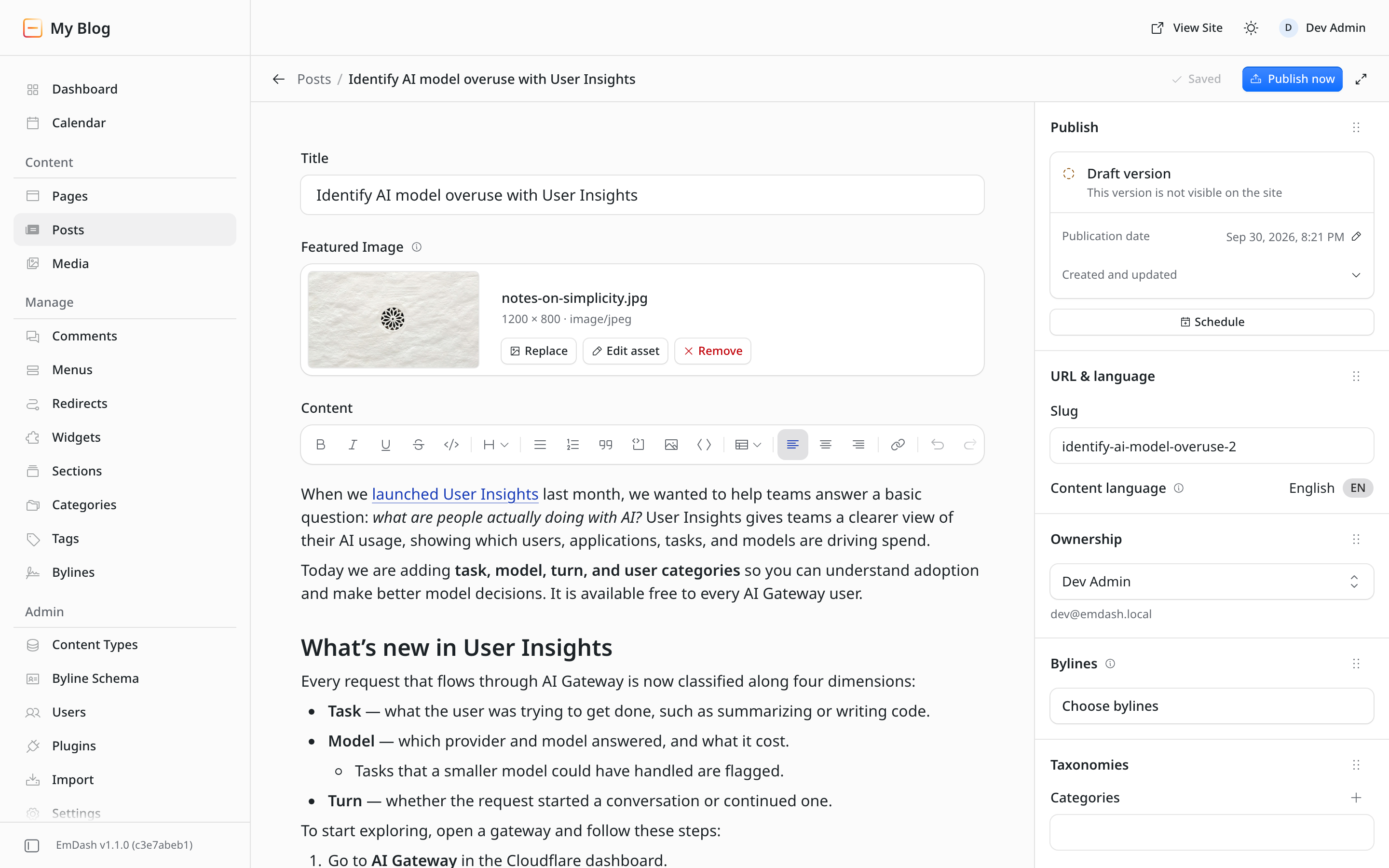
Other editing changes include:
- Enter or Down Arrow at the end of the title moves into the body, and Up Arrow on the first line moves back. Clicking below the last block continues writing at the end.
- Hovering a block shows +, which opens the slash menu on a new line, and a handle for dragging the block or opening its menu: Turn into, Align, Duplicate, Move up, Move down and Delete. Escape selects the current block, and the arrow keys then move between blocks.
- The slash menu is grouped, shows the Markdown shortcut for each block, and matches abbreviations such as
/blfor Bullet List as well as the Markdown itself, such as/#. - The formatting toolbar stays in view while you scroll. Selecting text shows a smaller toolbar with Turn into, link and inline marks, and clicking a link shows where it goes with Edit link and Remove link.
- Content typed, pasted or dropped into a quote or list that Portable Text can't store there, such as a heading or an image, lands beside it instead of disappearing on save.
- On phones and tablets the bar stays on one row, with secondary buttons shown as icons.
Other Portable Text fields keep the framed editor. Newly inserted HTML, iframe and code blocks now get the same keyboard behavior as blocks that were there when the page loaded. The redesign shipped in #3710. Thanks @khoinguyenpham04 for building it.
Add video to rich text
Type /video in the editor to pick a video from the Media Library or upload one. You can also drop or paste a video file anywhere in the text.
On the site, the PortableText component renders video blocks with Video from emdash/ui: the browser's own player, with the caption below it. Media Library videos play from your storage's public URL when one is configured. A block whose asset comes from a media provider renders that provider's embed. Uploads follow maxUploadSize, which is 50 MiB by default.
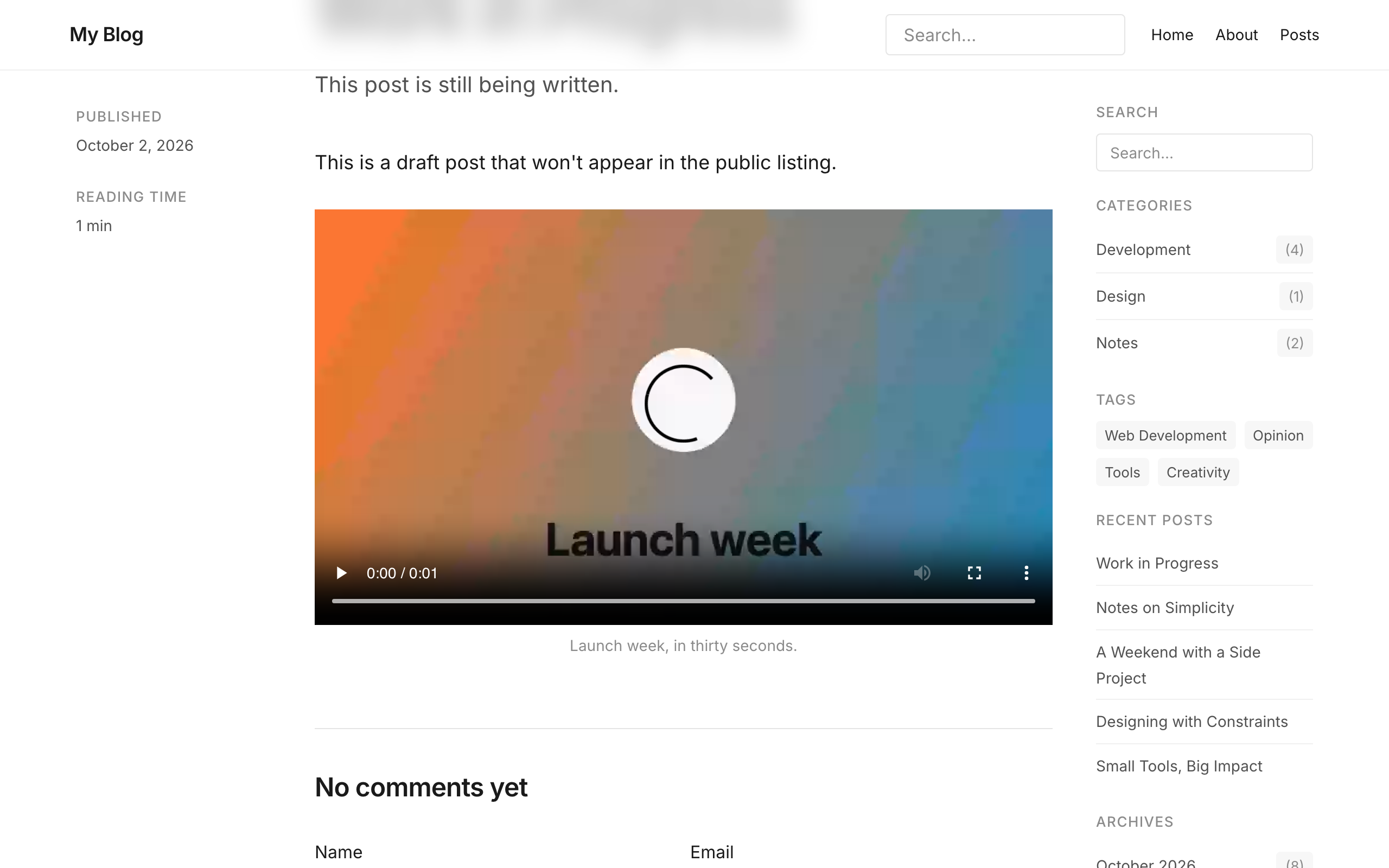
Videos served from /_emdash/api/media/file/ now play in Safari and on iOS. With the local, S3 and R2 storage adapters, the media route answers Range requests with 206 Partial Content (#3828). Custom storage adapters can add range support through the optional options.range argument to download(), described in the storage interface docs. Adapters that ignore it still work, returning the whole file.
Some sites need changes for video blocks (#3827):
- If a plugin already defines a
videoblock, the editor and site keep using the plugin's block. In TypeScript, narrowingPortableTextBlockon_type === "video"now givesPortableTextVideoBlock | PortableTextUnknownBlock, so reading the plugin's own fields needs a check. - If you use
portableTextToProsemirrorandprosemirrorToPortableTextin your own TipTap editor, add avideoBlocknode with the attributessrc,mediaId,provider,caption,widthandheightto its schema. - Code that checks every media reference type should accept
"portable_text_video". - With Astro's content security policy turned on and media on another host, allow that host in
media-src.
See Add a video for the editor and Query and render one entry for rendering.
Page through long collections
Every collection list in the admin now has numbered pages. The All and Trash tabs load one page at a time, so a collection opens with 20 entries instead of fetching 100. Both tabs use the Media Library's pagination footer, pinned to the bottom of the screen, with the entry range, a choice of 20, 50 or 100 entries per page, and controls to jump to any page. Selections persist across pages. The Trash badge now counts every trashed entry instead of stopping at 50.
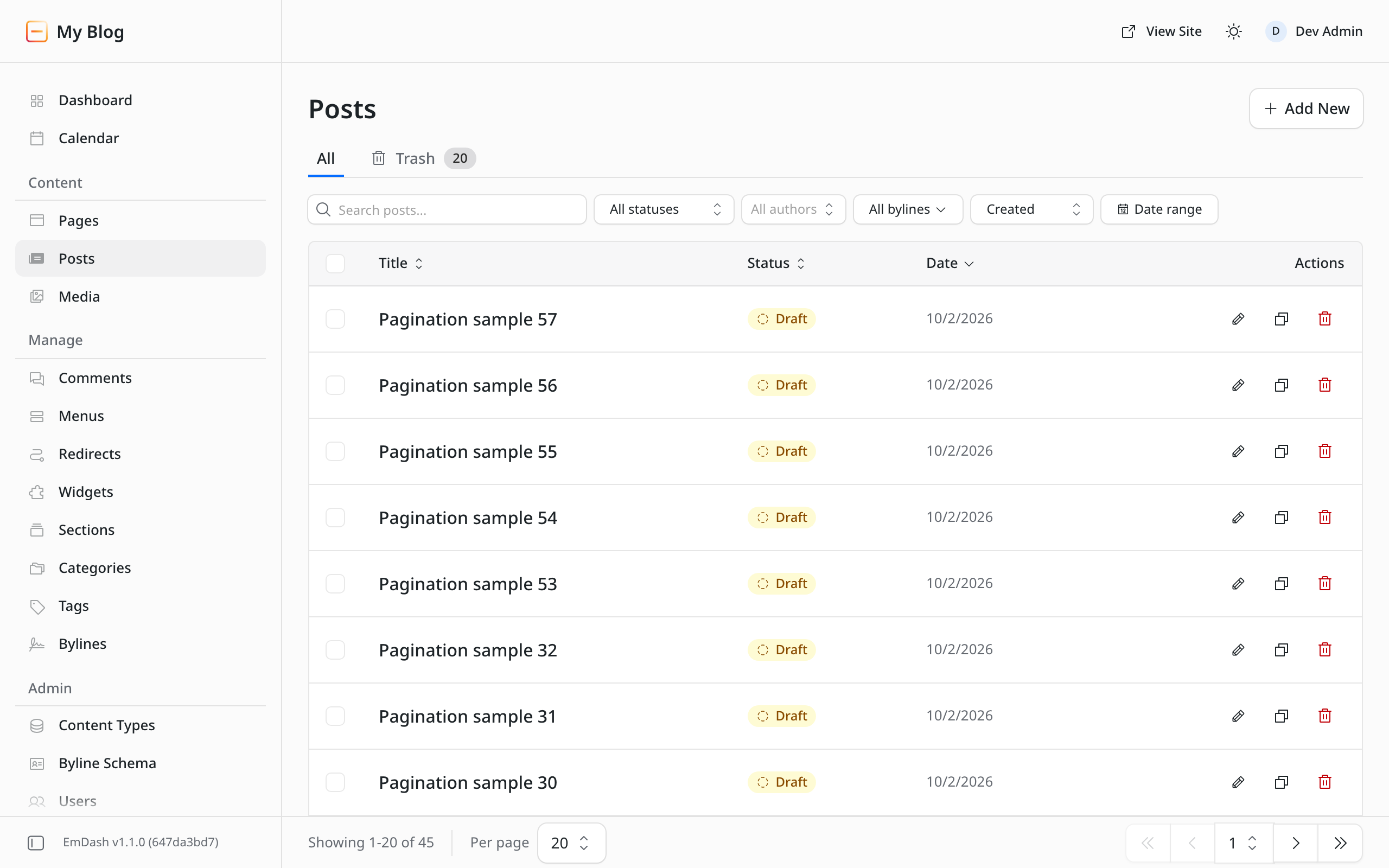
For API clients, GET /_emdash/api/content/{collection} and its /trash route accept a 1-based page parameter as an alternative to cursor. A numbered page returns total, and cursor pagination is unchanged (#3773).
Move a site to a new domain
Moving an EmDash site to a new domain used to leave things pointing at the old one. Email links used the address the site was set up on, plugins saw the same stale address, and nothing helped users whose passkeys stopped working at the new address. EmDash 1.2 adds a full domain-move flow to Settings > General.
Change domain opens a dialog that checks the new domain serves this site before it changes the Site URL. Links in emails and plugins, sitemaps, robots.txt, hreflang links, social image URLs and canonical links set in the SEO panel then use the new domain. If the check can't reach the site, for example on localhost or behind a login, the dialog offers to save the address without checking.
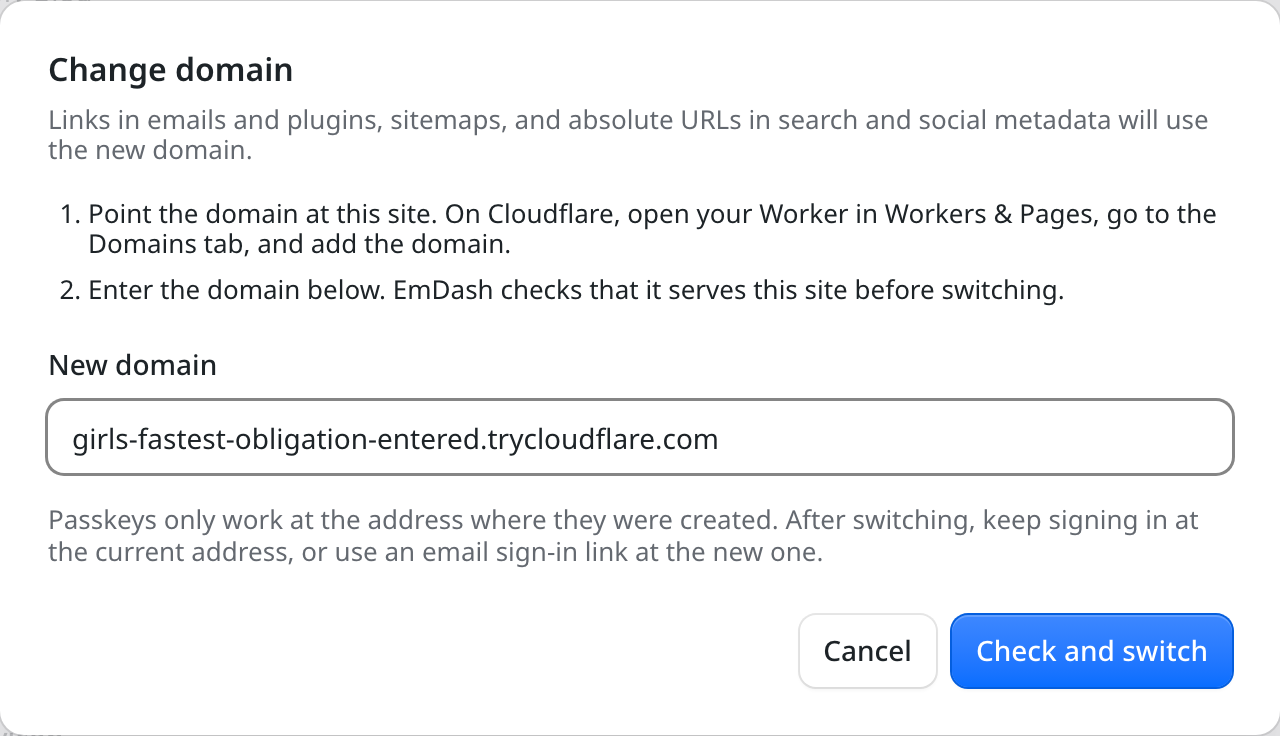
Passkeys only work at the address where they were created, so two more actions help people sign in after a move:
- Continue on appears when you are signed in at an address other than the Site URL. It signs you in at the new address with a single-use link that expires after 5 minutes, then opens Settings > Security so you can add a passkey there. It doesn't need email, and isn't shown when an external provider such as Cloudflare Access handles sign-in.
- Email users tells every other active user where the site now lives, with a button to the sign-in page at the new address. The email does not sign anyone in. It needs an email provider, passkey sign-in and the
users:managepermission, and can be sent 3 times per hour per site.
The Site URL field is now read-only and changes only through the dialog. When siteUrl, EMDASH_SITE_URL or SITE_URL is set, the page shows that address, and links in emails and plugins keep using it. Plugins now read the same address in ctx.site.url and ctx.url(). A changed Site URL reaches them after a restart, or as new isolates start on Cloudflare Workers.
This needs one check before upgrading. If you don't configure siteUrl, email links now use the Site URL field. If that field holds an address that no longer serves the site, see the upgrade notes.
The whole flow shipped in #3744. Thanks to @swissky, who built it along with more than 20 other changes in this release. See Move to a New Domain for the steps.
The admin in more languages
Translators did a lot of work for this release:
- European Portuguese (
pt-PT) is a new locale with Portuguese date formats. Browsers that ask forpt-PTget it instead of Brazilian Portuguese, and sites set topt-PTsend invite, sign-in and recovery emails in it (#3796, thanks @DiogoDuart3). - Hebrew is now in the admin language picker, rendered right to left with Hebrew month and weekday names (#3293, thanks @itaides).
- Thai is complete. Before, 1,725 of 3,188 strings fell back to English (#2791, thanks @SL33PiNg).
- German (#3835, @danielmlr), Catalan (#3852) and Traditional Chinese (#3860, @leevincent) are complete.
- Korean now covers almost every admin screen, with corrected terminology. (#3718, @huketo).
- Spanish (Spain) (#3721) and Serbian (Latin) (#3810) now use an informal tone throughout, with corrections. Thanks @miljan-aleksic for these and the Catalan work.
- Danish (#3558, thanks @kgni) and Indonesian (#3851, #3872, thanks @Zahid09987) cover the newest admin strings, and Japanese uses the catalog's long-vowel spellings consistently (#3789, thanks @maikunari).
Sites that use only some of these languages can now leave the rest out of the admin bundle with admin.locales (#3056):
emdash({
	admin: { locales: ["en", "de"] },
});
Only the listed languages are built in and offered in the language switcher, and en is always included as the fallback. An unknown code fails the build and lists the available codes. Sites that don't set the option keep every language. Separately, the admin now loads the date picker's localization for the active language on demand, which removes about 220 KB of JavaScript for every site (#3923).
Public sites can translate their comments too. Comments and CommentForm from emdash/ui/comments accept a labels prop for the heading, member badge, Like button, form fields and status messages. Comments also formats dates in the page locale (#3697).
Upgrade with one command
upgrade-emdash is a new, separately versioned CLI that runs from an existing site (#3804). It is designed to be run using npx, rather than being installed in the site:
npx upgrade-emdash@latestIt resolves the latest release of each direct emdash and @emdash-cms/* dependency and keeps the caret, tilde or exact style of each one. It also updates pnpm catalog: entries in pnpm-workspace.yaml, runs the project's package manager, and refreshes the project's agent skills. If any step fails, it restores the files it changed.
It then writes .emdash/UPGRADE.md, a work order for you or a coding agent. The work order holds the complete authored changelog entries between your installed and target versions, taken from each package's exact release tag. It also compares the core migrations before and after the install. When an upgrade adds a migration, the work order requires a successful build, a restorable recovery point and review of the migration target before deployment. The command does not edit application code, apply migrations or deploy.
Use --dry-run to see the plan without changing files, --json for the plan as structured data, and --yes to skip the prompt. The project needs emdash 0.35.0 or later installed, and Yarn Plug'n'Play is not supported. See Update EmDash for the full sequence.
Steadier on Cloudflare Workers
Several fixes target work that a Worker could cut short, or limits that D1 enforces:
- Background writes now run through
waitUntil, so they finish after the response instead of being cancelled. This covers API token "Last used" dates and expired-record cleanup (#3767), and redirect hit counts and 404 log entries (#3287). Thanks @danielmlr. It also coverscomment:afterCreatehooks, which sandboxed plugins could not complete before: a plugin that emails admins about new comments sent nothing (#3631, thanks @DavidPivert). - Every-minute cron ticks no longer exceed the Workers Free CPU limit on cold isolates. Bookkeeping cleanup now runs once an hour, while scheduled publishing and cron tasks still run every minute (#3861). The 404-log cleanup also skips its full-table scan when the table is under its cap (#3753).
- Assigning more than about 30 categories or tags to an entry, or removing more than about 100, no longer fails with
too many SQL variableson D1. This also fixes WordPress imports that left such posts without terms (#3889). Pluginctx.storagegetMany()anddeleteMany()accept any number of IDs (#3776). - On sites with several locales and a Cloudflare database (D1, Durable Object SQL or Hyperdrive),
entry.idalways includes the locale prefix. Before, it could be missing on some requests (#3922). See the upgrade notes if your templates build locale links themselves. - Fresh isolates start faster. The database setup check runs alongside runtime startup (#3573), plugin provider selections load with the other startup reads (#3574), and widget areas load without an extra round trip on logged-out pages (#3575). A temporary database error during the startup migration check no longer blocks that instance for 30 seconds when all migrations are applied.
Upgrade notes
No changelog entry in this release is marked as breaking, but some setups need attention:
- Email links and the Site URL field. If you don't configure
siteUrl,EMDASH_SITE_URLorSITE_URL, sign-in, invitation, signup, recovery and comment notification emails now link to the Site URL in Settings > General. Before upgrading, check that this field holds an address that serves your admin, such as your current domain and not an old one. Clearing it restores the previous behavior.emdash export-seedno longer copies the field, but seeds that setsettings.urlstill fill it in, so removeurlfrom a seed copied from another site (#3744). - Plugin install and activate hooks.
plugin:installandplugin:activatenow run for plugins in thepluginsarray ofastro.config.mjs. On existing sites, they run once on the first start after upgrading, for every such plugin you have never enabled, disabled or changed MCP access for in the admin. Check that each plugin'splugin:installis safe to run where the plugin is already in use. If a hook throws, EmDash disables the plugin and logs the error. Re-enable it from the Plugins page after fixing it (#3785). - Locale prefixes in `entry.id`. If your templates add the locale to links themselves, such as
/en/posts/${entry.id}, or passentry.idtogetEmDashEntry(), useentry.data.sluginstead (#3922). - Collection sitemaps. Each
/sitemap-{collection}.xmlnow holds up to 2,000 entries and continues at/sitemap-{collection}-2.xmland so on. Before, entries beyond the first 50,000 were dropped. If you submitted a collection sitemap directly to a search console, submit/sitemap.xmlinstead. If you replaced the sitemap routes, handle the extra pages (#3806, thanks @swissky). - Video blocks. Sites with a plugin
videoblock, a custom TipTap schema or a content security policy may need changes; see Add video to rich text. - `emdash seed --noContent`.
--no-contentnow skips the seed's content, bylines and taxonomy terms as documented. The undocumented--noContentspelling, which was the only one that worked before, is now ignored, so switch scripts to--no-content(#3525, thanks @danielmlr). - Comment dates.
Commentsformats dates in the page locale instead of always usingen-US. Passlocale="en-US"to keep the previous format on a localized site (#3697). - Image optimization behind a proxy. Sites that set their public origin with
EMDASH_SITE_URLorSITE_URLnow get optimized local images. The variable must be set whenastro buildruns (#3781). - `WebMcpSearch` results. The experimental
search_sitetool now fails on an empty query, HTTP error or network failure, and returns a JSON array of{ title, url, collection, excerpt }objects instead of a JSON-encoded string (#3894, thanks @oddharsh).
Smaller improvements and fixes
Editor and admin
- Opening an entry that fails to load shows a not-found page, a role explanation or a retry button instead of a blank screen (#3878).
- New entries start with each field's default value, so a boolean with
defaultValue: truestarts switched on (#3758). Thanks @danielmlr, who also fixed the byline dialog so its lower fields scroll into view (#3925) and localized error messages that stayed in English after a gateway error (#3933, #3931). - The field editor stays open and shows the server's error when a change is rejected, instead of closing and discarding it (#3701, thanks @ShaneMuir).
- The content list shows "Pending changes" only on entries that have a published version (#3010, thanks @eisenbruch).
- Saving SEO fields after a background refresh no longer reports false conflicts (#3831). A save that carries
_revcan no longer overwrite a change saved by another writer while the request was being processed; it returns409 CONFLICTinstead (#3930, thanks @ryofukutani). - The content editor opens entries with date fields even when the site's timezone setting isn't a valid IANA name. It falls back to UTC, and the settings API rejects unrecognized timezones (#3795). Thanks @DiogoDuart3, who also kept long descriptions inside their column in the "Add block" picker (#3798).
- Generated slugs handle non-ASCII labels:
GrößebecomesgroesseandTítulobecomestitulo. New repeater sub-fields get editable slugs (#3813). - Select All inside a code block selects only the code (#3559).
- The WordPress import's migration-key and site-URL fields stay inside their cards on narrow screens (#3728, thanks @huketo).
- External auth providers such as Cloudflare Access accept
syncName: falseto keep names edited in the admin (#3875). With the default syncing, the user editor shows the name as read-only with a hint to change it at the identity provider (#3877).
Visual editing
- Saving from the page keeps image links and alignment in Portable Text (#3746, thanks @keybits), and keeps superscript and subscript, which now have toolbar buttons. Fields with formatting the visual editor can't represent show a message instead of opening (#3591).
- Publish waits for inline saves to finish instead of publishing an older version (#3756), and the toolbar keeps its translated labels after a save (#3771).
- The editor toolbar, and the Cloudflare preview and playground toolbars, are inserted only before the closing body tag of a complete HTML document. Before, content containing
</body>, such as an image's alt text, could move the toolbar inside an attribute and turn the rest of the text into live markup (#3681, thanks @khoinguyenpham04). getEmDashCollection()returns draft revisions in edit mode and preview, matchinggetEmDashEntry(), so inline edits on list pages no longer appear to revert (#3802).
Media and images
- Media files and
/imagetransforms sendETagandLast-Modifiedand answer matching requests with304 Not Modified(#3855). - Small images such as avatars get a high-density
srcsetcandidate, and EmDash no longer requests sizes larger than the original (#3750). emdash media upload --altand--captionsave their values (#3755), and admin uploads runmedia:beforeUploadandmedia:afterUploadplugin hooks (#3914).
Sites, sitemaps and widgets
/sitemap-{name}.xmlreturns 404 for names that can't be a collection, such as/sitemap-0.xml, instead of a 500 (#3595, thanks @edrpls).- The
core:recent-postswidget shows each post's date and thumbnail (#3736) and accepts aurlTemplatesuch as"/blog/:slug"(#1899).getWidgetAreas()returns areas in creation order (#3575). - Parameterized redirects match URLs with a trailing slash (#3823), and
decodeSlug()returnsundefinedfor malformed slugs so pages fall through to 404 (#3731). - A fractional comment
limitis rounded down instead of failing with a 500 (#3381).CommentFormnow says whether a comment was published or is waiting for review (#3697). - Sites created from a template keep the title and tagline entered in the setup wizard (#3749), and the setup wizard loads on sites whose CSP uses
strictDynamic(#3754). astro devloadsEMDASH_ENCRYPTION_KEYfrom.env, so new Node.js sites can save secret plugin settings without exporting it first (#3911).
Plugins and the registry
- Plugin admin pages accept a
groupto place them in collapsible sidebar folders, alongside a collection's group or in a shared folder (#3546). - Plugin routes return error
detailsto the client (#3602, thanks @itaides), andPluginRouteErrorkeeps its code and status underastro dev(#3741, thanks @KirbyBT). - Plugin pages and widgets dim under a loading indicator while an action runs (#3369). Plugin block cards show
number_inputvalues in their summary (#3737, thanks @ryofukutani), and dashboard widget titles translate (#3786). - Every plugin permission has a readable label.
@emdash-cms/plugin-typesexportsdescribeCapability()for tools that list permissions (#3732). - Registry plugins attested with
actions/attest-build-provenancev3 (#3941) or by a reusable workflow in the same repository (#3943) install and update again. emdash-plugin buildbundles@emdash-cms/blocksfor sandboxed Block Kit plugins (#3884).emdash-plugin publish --no-manifestandrelease submit --no-waitwork as documented (#3777).- The registry loader's
includeLatestReleaseoption adds each package's latest release to collection listings, so catalogs can show plugin icons (#3548). - The Webhook Notifier settings page and dashboard widget load again when the plugin runs sandboxed (#3362, thanks @DavidPivert).
- Astro builds resolve the x402 middleware when
@emdash-cms/x402comes in through another integration (#3674, thanks @masonjames).
WordPress import
- Tables in Classic editor posts import as tables (#3762), and the media step uses smaller batches to stay within the Workers CPU limit (#3751). Thanks @danielmlr.
- Scheduled posts import as scheduled (#3895). Links to the old site's uploads outside image blocks point to the imported media (#3896). Buttons keep their links (#3893).
- Posts with thousands of nested or unclosed tags no longer overflow the stack (#3837) or stall in table parsing (#3792).
Seeds and CLI
- Seed validation reports reserved collection and field slugs such as
version(#3672, thanks @masonjames). It also warns about repeaters withoutvalidation.subFields(#3857) and widgets that set options undersettingsinstead ofprops(#3578). emdash typesoutput importsBylineSummary,ContentBylineCreditandTaxonomyTerm, fixingTS2304errors (#3920).- The datetime normalization migration no longer prints an error-level line when it has nothing to convert (#3553).
The same release commit updates @emdash-cms/auth (which now exports createMagicLinkUrl()), @emdash-cms/gutenberg-to-portable-text, @emdash-cms/registry-verification, @emdash-cms/registry-loader, @emdash-cms/plugin-cli, @emdash-cms/plugin-types, @emdash-cms/plugin-webhook-notifier and @emdash-cms/x402 with the changes above. @emdash-cms/auth-atproto, @emdash-cms/plugin-embeds, @emdash-cms/plugin-test and @emdash-cms/sandbox-workerd have dependency-only updates, and create-emdash and @emdash-cms/blocks received matching 1.2.0 tags with no changes.
Read the complete `emdash@1.2.0` release, then follow Update EmDash to back up, build, deploy and verify the site.